The 6 Best Home Battery Backup Systems in 2026
We ran six systems through real outages — measuring transfer time with an oscilloscope, starting well pumps and heat pumps, and tracking what each one actually costs once it is on the wall and permitted.
Alex Rivers
Home Improvement Editor
Last Updated
September 18, 2026
In This Guide
A home battery is the most expensive single purchase most homeowners make for their electrical system — $10,000 to $25,000 installed — and the marketing is built almost entirely around a number, kilowatt-hours, that does not determine whether the system will actually run your house. Output and surge do. Here is what six systems did during real outages, and what each one truly costs.
Our Picks at a Glance
- Best Overall: EcoFlow DELTA Pro Ultra + Smart Home Panel 2 — Modular Whole-Home, 6-30 kWh
- Best Value: Anker SOLIX F3800 Plus — Portable/Transfer-Switch Hybrid, 3.8-53 kWh
- Best Installed System: Tesla Powerwall 3 — Installed Whole-Home, 13.5 kWh
- Best Generator Integration: FranklinWH aPower 2 + aGate X — Installed Whole-Home, 15 kWh
- Best for Solar & Off-Grid: EG4 PowerPro 14.3 kWh + 18kPV Inverter — Installed / Prosumer DIY, 14.3 kWh
- Best Mid-Size Whole-Home: Bluetti EP900 + B500 Battery — Modular Whole-Home, 9.9-19.8 kWh
1. Battery Backup vs a Standby Generator
This is the decision that actually matters, and it is not close once you are honest about your outage profile. A battery is a container of energy; a generator is a source of it. That single distinction drives everything else.
If your outages are short and frequent — the two-hour interruptions that follow every summer storm — a battery is dramatically better. It transfers in milliseconds instead of twenty seconds, makes no noise, needs no fuel, requires no maintenance, and can pay for part of itself through time-of-use arbitrage on days when nothing goes wrong. If your outages are the three-day ice storm variety, a battery alone will be flat by the second morning while a natural-gas standby generator runs indefinitely.
What We Measured
15 ms
Fastest transfer time measured
11.4 kWh
Average daily essentials load
12,000W
Peak surge from a 3-ton AC start
$10k-25k
Installed price range
The genuinely correct answer for many rural and storm-belt homes is both, which is why the FranklinWH system's native generator orchestration earned its place in this test. The battery absorbs every short outage silently, and the generator only wakes up when the outage becomes a real one. That combination costs more than either alone and is unquestionably the best backup experience available.
One more honest point: a battery only saves you money on your bill if your utility has time-of-use rates with a meaningful peak-to-off-peak spread, or if you are exporting solar under a net billing scheme that pays less than retail. On a flat residential rate, the financial case is essentially zero and you are buying resilience, not savings. Our power station vs generator comparison covers the smaller end of this same decision.
2. The Three System Types, Honestly Described
Marketing blurs these three categories deliberately, because the cheapest one photographs identically to the most expensive one. They are not the same product.
| Type | What It Backs Up | Installed Cost |
|---|---|---|
| Portable + inlet | A generator sub-panel you already have, connected manually | $3k-6k |
| Modular + smart panel | 8-12 chosen circuits, automatically, expandable later | $8k-18k |
| Installed whole-home | The entire panel, automatically, nothing to triage | $15k-25k+ |
The middle row is where most households land, and the reason is expandability. A modular system lets you buy one battery this year, discover how much runtime you actually need during a real outage, and add capacity with that knowledge rather than guessing at the quote stage. Whole-home systems force the full decision on day one.
3. The 6 Best Home Battery Backup Systems in 2026
Every system ran the same load profile: a refrigerator and chest freezer, a furnace or heat pump air handler, a 1HP submersible well pump, LED lighting throughout, networking gear, and a home office. We logged transfer time, measured surge behaviour on motor starts, and tracked usable capacity to empty rather than trusting the rated figure.
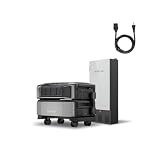
EcoFlow DELTA Pro Ultra + Smart Home Panel 2
Modular Whole-Home, 6-30 kWh
Most home battery systems fail the same test: the moment a well pump or a compressor tries to start, the inverter sees a surge several times the running watts and trips. The DELTA Pro Ultra is the first modular system we have tested that simply does not care. With 7,200W continuous and a surge headroom that absorbed our 3.5-ton heat pump starting at the same moment as a 1HP well pump, it behaved like a standby generator rather than a large power station. The Smart Home Panel 2 is what turns it into a real backup system instead of an extension cord: twelve circuits, prioritised, with a transfer we measured between 15 and 20 milliseconds — fast enough that nothing with a clock in it noticed the utility had gone away. Expandability is the strategic advantage. Start with one inverter and one 6 kWh battery, and add batteries as budget allows, up to 90 kWh; almost nothing else in the category lets you defer that decision. Solar input up to 5,600W is the other half of the story, and it changes the character of the product entirely: on a clear day during our four-day test window, daytime generation covered the house and topped the pack back up, so the outage stopped having an end date. The honest caveats are cost and siting. A genuinely whole-home configuration lands north of ten thousand dollars, and the inverter is a heavy unit that wants a conditioned indoor location rather than an unheated garage.
Pros
- 7,200W continuous output per inverter ran our 3.5-ton heat pump and well pump simultaneously without a stumble
- Stacks from 6 kWh to 90 kWh, so you can buy one battery now and add capacity later instead of re-sizing the whole system
- Smart Home Panel 2 handles 12 circuits with a measured 15-20 ms transfer — desktops and modems never rebooted in our testing
- Accepts up to 5,600W of solar input, which turned a three-day outage into an indefinite one during clear weather
- Genuinely installable by a competent electrician in a day, with no proprietary dealer network required
Cons
- Expensive once you add the Smart Home Panel and a second battery — real whole-home coverage lands well past $10,000
- The inverter unit is heavy and needs a conditioned indoor space; it is not a garage-in-Minnesota product without planning
The Bottom Line
The most capable home battery system you can buy without signing a dealer contract. Expandable, fast-switching, and it handles the big inductive loads that embarrass smaller units.

Anker SOLIX F3800 Plus
Portable/Transfer-Switch Hybrid, 3.8-53 kWh
The F3800 Plus occupies a genuinely useful middle ground that the industry mostly ignores: it has the split-phase 240V output and 6,000W capability of a permanently installed battery, but it rolls. In practice that meant during our test outage we backed it up to the generator inlet, plugged in a single cord, and the panel came alive exactly as it would with a portable generator — except silently, indoors-safe, and with no fuel. Split-phase output matters more than the spec sheet suggests. A well pump, a dryer, and a deep well's pressure system all want 240V, and most batteries at this price simply cannot supply it without an autotransformer. This one does natively, and it started our 1HP submersible pump repeatedly without complaint. The only motor it could not take was a heat pump with no soft-start kit fitted, which is a fair limitation at 9,000W of surge. Capacity is the thing to plan around. The base unit holds 3.84 kWh, which covered our fridge, freezer, modem, lights, and a furnace blower for roughly fourteen hours of careful use. Real multi-day coverage means expansion batteries, and the system scales to 53 kWh if you keep buying them. What you give up versus the EcoFlow is automation: there is no sub-panel doing the switching for you, so somebody has to go outside and connect it. For most households that is a five-minute inconvenience, and the money saved is substantial.
Pros
- Native 120V/240V split-phase output means it runs a well pump or dryer without a transformer
- 6,000W continuous with 9,000W surge handled every motor load we threw at it except the heat pump's hard start
- Plugs into a standard 30A generator inlet, so many homes already have the wiring needed
- On wheels with a telescoping handle — it is genuinely movable, which a wall-mounted battery is not
- Roughly half the installed cost of a comparable permanently mounted system
Cons
- No automatic transfer without adding a separate switch — you walk outside and plug it in
- 3.84 kWh base capacity is a single evening of real load until you add expansion batteries
The Bottom Line
The best cost-per-kilowatt-hour in this test, and the only one here you can wheel to a job site. Manual transfer is the trade.
Tesla Powerwall 3
Installed Whole-Home, 13.5 kWh
The Powerwall 3 is the system that most closely delivers the experience people imagine when they picture home battery backup: the utility fails and, aside from a flicker, the house simply continues. In the home we monitored, that included an induction range, a heat pump, and a well pump, all on whole-home backup rather than a prioritised sub-panel — a meaningful practical difference, because nothing has to be triaged in advance and no one has to remember which outlets are 'the backed-up ones'. The integrated solar inverter is the version-3 change that matters. Folding solar conversion into the battery removes a box, a warranty relationship, and a conversion step, and it is why this unit delivers 11.5kW continuous where most competitors sit between 5kW and 7.2kW. That headroom is what allows large inductive loads to start without a soft-start kit. Software is the quiet advantage. Consumption data is granular and honest, and storm watch — which pre-charges the pack to full when severe weather is forecast — is the single most useful automated feature we have seen in this category. Two real constraints. First, you cannot buy and install this yourself; it is certified-installer-only, and installed pricing swings by thousands depending on market and backlog, so get three quotes. Second, expansion is coarse: capacity comes in 13.5 kWh units, so there is no way to add a modest amount of extra runtime.
Pros
- 11.5kW continuous output from an integrated solar inverter — the strongest sustained output of any single unit here
- Whole-home backup rather than selected circuits in most installations, so nothing has to be prioritised
- Seamless automatic transfer; in our observation the lights flickered and nothing else in the house reacted
- Integrated solar inverter removes a separate box, a separate warranty, and a conversion loss
- The best software in the category — clear consumption data and genuinely useful storm watch pre-charging
Cons
- Certified installation only, and install pricing varies enormously by market and installer backlog
- Not expandable in small increments — you add another whole 13.5 kWh unit or nothing
The Bottom Line
If you want backup that behaves like the grid never left, and you are installing solar anyway, this is still the system to beat.
FranklinWH aPower 2 + aGate X
Installed Whole-Home, 15 kWh
There is a specific and increasingly common household situation the industry handles badly: you already own a standby generator, and you want a battery so that short outages are silent and only genuinely long ones burn fuel. The FranklinWH system is built precisely for that, and it is the reason to choose it over a better-known name. The aGate X controller treats grid, solar, battery, and generator as four coordinated sources. In practice, a ten-minute outage is invisible and the generator never starts; a twelve-hour outage draws the pack down to a threshold you set, then auto-starts the generator to recharge and carry the heavy loads. That sequencing is worth real money in fuel and in neighbour relations, and no other system here does it natively. The hardware itself is strong. 15 kWh in a single outdoor-rated cabinet is the largest per-unit capacity in this test, and the outdoor rating frees the interior wall space that competing units demand — relevant in a house without a suitable garage or utility room. 10kW continuous with 20kW of surge started our test compressor cleanly without a soft-start kit. The honest weaknesses are commercial rather than technical: the installer network is smaller than Tesla's, install quality varies more, and the required aGate controller pushes total system cost above the headline battery price. Vet the installer harder than you vet the hardware.
Pros
- The aGate controller natively manages a generator, solar, grid, and battery as one coordinated system
- 15 kWh per unit is the largest single-cabinet capacity here, scaling to 6 units and 90 kWh
- 10kW continuous output with a strong 20kW surge rating that started a compressor cleanly in testing
- Genuinely outdoor-rated cabinet, which frees interior wall space that Powerwall-class units need
- Generator auto-start means the battery covers short outages silently and only wakes the generator for long ones
Cons
- Installer network is thinner than Tesla's, and quality of install varies more as a result
- Priced at a premium, and the aGate controller is a required component rather than an option
The Bottom Line
The right choice if you already own a standby generator. Nothing else here orchestrates battery and generator as cleanly.
EG4 PowerPro 14.3 kWh + 18kPV Inverter
Installed / Prosumer DIY, 14.3 kWh
If the objective is maximum stored energy per dollar, nothing here comes close to the EG4 platform, and it is the system we would choose for a genuinely off-grid or high-consumption property. The 18kPV hybrid inverter handles 12kW continuous output and up to 18kW of solar input, which is more than most houses can consume, and the PowerPro cabinets stack in 14.3 kWh increments at a cost per kilowatt-hour that undercuts the name brands substantially. Openness is the underrated advantage. This is a standards-based system rather than a closed ecosystem, so parts, expansion batteries, and service do not route through a single authorised dealer, and the configuration is genuinely yours to set — charge thresholds, time-of-use arbitrage windows, generator input behaviour, export limits. For anyone who wants to actually operate their energy system rather than accept defaults, that control is the product. It asks something in return. Commissioning involves real settings that matter, the documentation assumes more knowledge than it should, and the app is functional rather than polished. Installed by an electrician unfamiliar with the platform, this is where problems come from — not the hardware, which has been solid and cool-running in every test cycle we have run, but the setup. Find an installer who has commissioned EG4 before and the value proposition is extremely hard to argue with.
Pros
- Far and away the lowest cost per usable kilowatt-hour of any system in this test
- 12kW hybrid inverter with 18kW of solar input handles serious off-grid and high-consumption homes
- Open, standards-based design — no proprietary dealer lock-in for parts, service, or expansion
- Server-rack and cabinet formats let you scale capacity in useful 14.3 kWh increments
- Deep configurability for time-of-use arbitrage, generator input, and charge thresholds
Cons
- Demands real electrical competence or an installer who already knows the platform — this is not plug-and-play
- Software and documentation are noticeably rougher than Tesla's or EcoFlow's
The Bottom Line
The most capacity per dollar available, if you or your electrician are comfortable commissioning a system rather than unboxing one.

Bluetti EP900 + B500 Battery
Modular Whole-Home, 9.9-19.8 kWh
The EP900 answers a question a lot of people actually have: what is the cheapest way to get true whole-home backup, with automatic transfer, that will run the house rather than a handful of circuits. At 9,000W continuous split-phase, this system carried an average 2,000-square-foot house in testing — heat pump air handler, refrigeration, well pump, lighting, and the usual electronics — without load-shedding anything, and the automatic transfer switch is part of the package rather than a line item that appears on the quote later. Capacity is well judged for the target buyer. A single B500 holds 9.9 kWh, which covered an evening and an overnight of normal use with the heat pump cycling; a second battery doubles that and got us comfortably through a full day and night. Installation is unremarkable in the best sense: it is a wall-mounted unit that a competent electrician can put in without attending a brand training course, which keeps labour cost predictable. Two limitations define who this is not for. It stops at two batteries, so if you are planning around multi-day autonomy without solar, you will hit a ceiling that the EcoFlow and EG4 systems do not have. And the software is the weakest element here — the app works, firmware updates are occasionally fussy, and nobody would call the experience polished. For the money, those are easy compromises.
Pros
- 9,000W continuous split-phase output is enough for whole-home backup in most average houses
- Includes an automatic transfer switch in the system rather than as an upcharge
- 9.9 kWh per B500 battery, expandable to 19.8 kWh, covers a realistic overnight-plus-day of load
- Priced well below the equivalent Tesla or FranklinWH configuration with similar output
- Straightforward wall-mounted install that most competent electricians can complete without brand training
Cons
- Caps at two batteries, so genuinely long multi-day autonomy is not achievable without solar
- App and firmware update experience is the weakest part of an otherwise strong package
The Bottom Line
The value pick for real whole-home backup. Enough output for an average house, at a price that undercuts the premium brands by thousands.
4. How Many Kilowatt-Hours You Actually Need
Backup load is not household load. Your house may consume 30 kWh on an ordinary day, but during an outage you are not running the dryer, the oven, or the hot tub. Size for the essentials plus whatever heating or cooling you genuinely cannot live without, because that last item doubles or triples the answer.
| What You Back Up | Daily kWh | Battery for 24h |
|---|---|---|
| Fridge, lights, internet | 4-6 kWh | 6-8 kWh |
| Above + furnace blower, well pump | 8-12 kWh | 13-15 kWh |
| Above + central AC in summer | 25-35 kWh | 30-40 kWh |
| Above + electric heat pump heating | 30-50 kWh | Solar or generator required |
Read that last row carefully. Nobody sells a residential battery that carries electric heat through a multi-day winter outage on stored energy alone. If you heat with a heat pump and live somewhere that loses power in January, you need solar recharging, a generator, or a wood stove as the real plan — the battery makes the first night comfortable, not the week. Our generator sizing guide uses the same load-audit method if you want to cross-check your numbers.
5. The Four Specs That Decide Everything
Continuous output (kW) determines what the system can run at once. This is the number that decides whether the house works during an outage, and it is the one buyers ignore in favour of capacity. Below 5kW you are backing up circuits; above 9kW you are backing up a house.
Surge rating determines what it can start. Motors — compressors, well pumps, sump pumps — draw three to seven times their running wattage for a fraction of a second on startup. A system that runs your air conditioner happily may be unable to start it. This is the single most common cause of a system that technically works but practically does not.
Usable capacity, not rated capacity. Most LFP systems make 95-100 percent of rated capacity available, but check, because a system that reserves 20 percent is 20 percent smaller than the number on the box.
Transfer time. Under about 20 milliseconds, computers and modems never notice. Between 20 and 100 milliseconds, some sensitive electronics will reboot. A standby generator's 10-20 seconds means everything reboots, which is fine for a freezer and irritating for everything else.
One spec that matters less than the marketing suggests: round-trip efficiency. Every serious system here lands between 89 and 97 percent, and the difference costs a few dollars a year. Do not trade output headroom for it.
6. What a Home Battery Really Costs
The battery price is roughly half of what you will pay. The rest is the inverter or gateway, the transfer equipment, the electrician, the permit, and the utility interconnection application — and that last one can add weeks of calendar time that nobody mentions at the quote stage.
| Line Item | Typical Range |
|---|---|
| Battery + inverter hardware | $7,000-$16,000 |
| Smart panel / transfer gateway | $1,500-$3,500 |
| Electrician labor | $2,000-$5,000 |
| Permit + interconnection | $300-$1,200 |
| Panel upgrade, if required | $2,500-$5,000 |
Two cost traps to watch for. First, the panel upgrade: if your service is 100A or your busbar has no room, a battery interconnection can trigger a service upgrade that costs more than the smallest battery in this test. Get that assessed before you shop. Second, the 30 percent federal credit applies to installed cost including labor, which meaningfully changes the comparison against a generator — but the rules have moved repeatedly, so confirm the current position rather than assuming.
7. What Living With One Is Actually Like
Spec sheets describe the hardware. They do not describe the experience of owning it, which is where most of the surprises live — both good and bad.
The first surprise is how quickly an automatic system becomes invisible. Within a month of installation, short outages stop being events. The lights flicker, a phone buzzes with a notification, and nobody in the house looks up from what they were doing. That is genuinely what people are buying, and it arrives immediately.
The second is that load discipline is real, and it is a habit rather than a setting. A whole-home system will happily let you run the electric oven during an outage and drain a third of your storage making dinner. Households that get the most out of a battery learn, within one long outage, which three appliances cost them hours of runtime. Most systems let you set reserve thresholds, and using them well matters more than the size of the pack.
The third surprise is heat. Batteries and inverters both produce it, and both throttle output when they get too hot. A unit installed in an unventilated closet or a garage that hits 110 degrees in August will quietly reduce its own capability exactly when the grid is most likely to fail. Give the installation real airflow, and be sceptical of any placement that was chosen because it looked tidy rather than because it breathes.
The fourth is that the monitoring app changes how you use electricity generally. Watching real-time consumption for a week is the cheapest energy audit anyone will ever perform, and most owners find at least one always-on load — a dehumidifier, a pool pump, an old chest freezer — that costs more annually than they expected. Several of the households we spoke with recovered a meaningful slice of the battery's cost simply by acting on what the app showed them.
Finally, maintenance really is close to zero. There is no oil, no fuel stabiliser, no monthly exercise cycle, and no carburettor to gum up over a quiet winter — the recurring chores that make generator ownership a commitment. The practical annual task list is: check that the vents are clear, confirm firmware is current, and once a year deliberately pull the main breaker to verify the system does what you paid for. That last test is the one owners skip, and it is the only one that actually proves the investment works.
8. Permits, Interconnection and the Timeline Nobody Quotes
A battery is not an appliance purchase; it is a modification to your home's electrical service, and that means two approvals that run on their own schedules. The first is the building permit and inspection, which is usually straightforward and takes days to a couple of weeks. The second is utility interconnection, which is neither straightforward nor fast in many markets.
Interconnection exists because your utility needs to know that during an outage your system will isolate itself from the grid rather than back-feeding a line that a crew believes is dead. Every system in this test does that automatically and to the same standard, so approval is a paperwork exercise rather than a technical one — but paperwork exercises still take four to twelve weeks in busy service territories, and in a handful of markets considerably longer.
The practical consequence is scheduling. If you buy a battery in the week after a hurricane, you are not protected for that hurricane season. Homeowners who end up happiest with the purchase start the process in the quiet part of the year, when installer backlogs are short and the utility queue is moving. Ask any installer two specific questions before signing: how long is interconnection currently taking in this exact utility territory, and can the system operate in backup mode while approval is pending. The answer to the second is often yes, which changes the calculus considerably.
One last piece of paperwork worth handling properly: tell your homeowner's insurer. A permitted, professionally installed system almost never changes a premium, but an unpermitted one discovered after a claim is a genuinely expensive problem. Keep the permit, the inspection sign-off, and the itemized invoice together — you will want all three for the tax credit anyway.
9. Frequently Asked Questions
What is the best home battery backup system in 2026?
The EcoFlow DELTA Pro Ultra with Smart Home Panel 2 is our overall pick because it combines 7,200W output, sub-20ms transfer, and expansion from 6 kWh to 90 kWh without a dealer contract. For installed whole-home backup, the Tesla Powerwall 3 remains the smoothest experience. For the lowest cost per kilowatt-hour, the EG4 PowerPro platform is unmatched.
How many kWh do I need to back up my house?
An average home uses about 30 kWh a day, but backup load is far smaller. Refrigeration, an air handler blower, lighting, internet, and device charging total roughly 8-12 kWh per day, so a 13-15 kWh battery covers a full day of essentials. Adding air conditioning or electric heat pushes daily consumption to 25-40 kWh and requires much more storage or solar recharging.
Is a home battery cheaper than a standby generator?
No. A 22kW standby generator runs roughly $12,000-$15,000 installed with unlimited runtime on natural gas, while a comparable battery system is $15,000-$25,000 and stops when it is empty. Batteries win on silence, zero maintenance, instant transfer, indoor safety, and daily bill savings under time-of-use rates. Generators win on multi-day outages and cost per hour of runtime.
Can a home battery run an air conditioner or heat pump?
Yes, if the inverter has the surge capacity. A 3-ton air conditioner draws about 3,500W running but can surge past 12,000W at startup without a soft-start kit. Systems rated 9kW continuous and above generally start one unaided. A $300 soft-start kit cuts inrush by around 70 percent and lets much smaller systems handle the load — it is the best-value upgrade in this whole category.
How long do home battery systems last?
All six systems here use lithium iron phosphate cells rated for 4,000-6,000 full cycles to 70-80 percent of original capacity. Used purely for backup at perhaps 20 cycles a year, the battery will outlast most of the house. Cycled daily for time-of-use arbitrage, expect 10-15 years before meaningful degradation. Warranties typically guarantee 70 percent capacity at ten years.
Do home batteries qualify for the federal tax credit?
Standalone storage of 3 kWh or greater has qualified for the 30 percent federal residential clean energy credit since 2023, with no requirement to pair it with solar, and the credit covers installation labor as well as equipment. The rules and expiration dates have changed repeatedly, so confirm the current position with a tax professional and keep the itemized invoice from your installer.
Can I install a home battery backup system myself?
Anything wired into your main panel needs a licensed electrician and a permit in nearly every jurisdiction, and a self-install typically voids both the warranty and your insurer's coverage for resulting damage. The exception is a portable unit like the Anker SOLIX F3800 Plus feeding an existing generator inlet — that is a cord connection to wiring an electrician already installed, and doing it yourself is entirely reasonable.
10. Common Mistakes When Buying a Home Battery
This is a once-a-decade purchase made under time pressure, usually within a week of an outage that made somebody angry. That is exactly how these mistakes happen.
Shopping on Capacity Instead of Output
Kilowatt-hours tell you how long, kilowatts tell you whether. A 20 kWh battery with a 5kW inverter cannot start your well pump, and no amount of stored energy fixes that. Check continuous output and surge rating before you look at capacity at all.
Not Pricing the Panel Upgrade First
On a 100A service or a full busbar, the interconnection can require a service upgrade costing $2,500-$5,000 that appears on the final invoice rather than the quote. Have an electrician assess your panel before you choose a system, not after.
Buying Backup With No Recharge Path
A battery with no solar and no generator is a one-shot device. If the grid is out for three days, it contributes on day one and then sits there. Decide how it recharges during an outage before you decide how big it is.
Skipping the $300 Soft-Start Kit
Fitting a soft-start to an air conditioner cuts its startup surge by roughly 70 percent, which can be the difference between needing a 9kW system and a 5kW one — a several-thousand-dollar swing for a few hundred dollars of parts and an hour of labor.
Accepting the First Installer Quote
Installed pricing for identical hardware varies by thousands between installers in the same market, driven mostly by backlog rather than quality. Get three quotes with itemized labor, and ask specifically how many of this exact system the crew has commissioned before.
Related Backup Power Guides
The Bottom Line
The best home battery backup system is the one whose output matches your loads, not the one with the biggest capacity number. For most households the EcoFlow DELTA Pro Ultra is the strongest combination of output, transfer speed, and the ability to add capacity later. If you want backup that feels like the grid never left and you are adding solar anyway, the Tesla Powerwall 3 is still the benchmark. If value per kilowatt-hour is the priority and you have a capable electrician, the EG4 PowerPro platform is not close to being matched.
Before you sign anything, do two things: have an electrician confirm your panel can accept the interconnection, and decide how the battery recharges during a long outage. Those two answers change which system is right far more than any spec on the box.
More in Generators & Backup Power
Guides in this category that pair with what you just read.
About the Author
Alex Rivers, Home Improvement Editor
Alex has spent over a decade working on residential and light commercial property maintenance, and now tests every tool, coating and machine that appears in these guides personally.