Best Hygrometers
A dehumidifier's built-in humidistat is a guess. A decent hygrometer tells you the real number, where it matters, and whether it stays there overnight.
Alex Rivers
Home Improvement Editor
Last Updated
September 29, 2026
In This Guide
Most people buy a hygrometer after something goes wrong: a musty basement, a foggy window, a mold spot behind the couch. The right one costs less than a takeout dinner, and the difference between a good one and a bad one is not the display. It is whether the number is within a few percent of the truth and whether it remembers what happened while you were asleep.
Our Picks at a Glance
- Best Overall: ThermoPro TP357 Bluetooth Hygrometer Thermometer — Bluetooth Sensor with Display and App
- Best Budget: ThermoPro TP50 Digital Hygrometer Indoor Thermometer — Standalone Digital Display
- Best Wi-Fi Hygrometer: Govee WiFi Thermometer Hygrometer H5179 — Wi-Fi and Bluetooth Sensor with Display
- Best Data Logger: SensorPush HT1 Wireless Thermometer Hygrometer — Bluetooth Data Logger, Optional Wi-Fi Gateway
- Best Standalone With Alarms: AcuRite Pro Accuracy Indoor Temperature and Humidity Monitor 01083 — Standalone Display with Alarms
- Best Budget Bluetooth: Govee Bluetooth Hygrometer Thermometer H5075 — Bluetooth Sensor with Display
- Best for Cold Spaces: Inkbird IBS-TH2 Bluetooth Thermometer Hygrometer — Bluetooth Logger with Display, Wi-Fi Gateway Optional
1. How We Picked
A hygrometer has one job, and it is easy to judge: does the number match reality closely enough to act on? We focused on that first. Every candidate had to be a current, widely sold model with a published humidity accuracy rating, and we ran each through a saturated salt test, which holds the air in a sealed bag at a known 75 percent relative humidity, to see whether it lived up to that rating.
We then set the survivors side by side in three places with very different conditions: a finished bedroom, an unfinished basement running a dehumidifier, and a garage that swings with the weather. Watching them together for several weeks showed which ones agreed with each other, which responded quickly to a change like a hot shower or a door opening, and which drifted or lagged.
Accuracy alone does not decide which hygrometer is most useful, though. A sensor that logs every few minutes and lets you scroll back through a wet week answers questions a display never can. A Wi-Fi sensor that texts you when a crawl space passes 60 percent prevents problems a more accurate standalone unit would only report after the fact. So we weighed history, alerts and ease of reading nearly as heavily as the sensor spec.
We left out analog dial hygrometers, which are routinely off by 5 to 10 percent and difficult to calibrate, and very cheap unbranded digital units whose accuracy was no better than a guess. We also left out professional instruments costing several times more than anything here, since a homeowner does not need laboratory precision to decide whether a basement needs a dehumidifier.
2. What Hygrometer Accuracy Really Means
Hygrometer boxes quote accuracy as plus or minus a percentage of relative humidity, usually 2 or 3 percent for decent consumer units. That means a hygrometer showing 50 percent with a 3 percent tolerance could be sitting in a room anywhere from 47 to 53 percent. For deciding whether a basement is too damp, that range is fine. For a humidor or an instrument case, where the target is a narrow band, it is the difference between right and wrong.
Read the fine print, because the headline number rarely applies everywhere. The ThermoPro TP50 is rated at plus or minus 2 percent between 30 and 80 percent RH and 3 percent outside that band. SensorPush quotes 3 percent typical and 4.5 percent maximum in the middle range. Almost every sensor gets less accurate near the extremes, at very low or very high humidity, and in cold temperatures.
HOW CLOSE IS CLOSE ENOUGH
±2%
Good consumer spec, 30 to 80% RH
±3%
Typical smart-sensor spec
75%
Salt test reference humidity
±5-10%
Common error of analog dials
Sensors also drift. Capacitive humidity sensors, the kind in every digital hygrometer here, slowly shift over months and years, especially after long exposure to very damp air. That is not a defect; it is how the technology ages. It is the reason we recommend a salt test when a new hygrometer arrives and again once a year.
Finally, give any hygrometer time. Carry one from a warm kitchen to a cool basement and it may take 20 to 30 minutes to settle, because both the sensor and the plastic housing have to reach the new temperature. A reading taken the moment you set it down is not a reading you should act on.
3. Our 7 Top Picks
These seven cover the three ways people actually use a hygrometer: a simple screen you glance at, a Bluetooth sensor that logs to your phone, and a Wi-Fi sensor that alerts you from anywhere. Every one passed a salt test within its stated tolerance, or close enough that a one-time offset fixed it. We ranked them on accuracy first, then on how much useful history they keep, then on how easy the number is to read and act on in a real basement or bedroom.
ThermoPro TP357 Bluetooth Hygrometer Thermometer
Bluetooth Sensor with Display and App
The TP357 is the hygrometer we would hand to almost anyone, because it does both jobs a humidity monitor needs to do. On its own it is a clear digital display with temperature, humidity and a simple comfort indicator, and it sits on a shelf or sticks to a wall like any basic unit. Pair it with the ThermoPro app over Bluetooth and it becomes a logger, keeping up to a year of history that you can scroll back through without creating an account. That history is where the value lies. A single reading tells you the humidity right now; a week of readings tells you whether your dehumidifier is keeping up overnight, whether the bathroom fan clears a shower in twenty minutes or two hours, and whether the basement spikes every time it rains. ThermoPro rates the sensor at plus or minus 2 percent RH and half a degree Celsius, and ours landed within that band on a salt test. The Bluetooth 5.0 radio reaches much farther than older sensors, which matters when the unit lives in a basement and your phone lives upstairs. The limitation is that it is still Bluetooth: alerts only arrive when your phone is in range, and data only syncs when you open the app. If you need remote alerts, look at the Govee H5179. For everyone else this is the one to buy, and at this price it is worth buying two.
Pros
- Rated to plus or minus 2 percent RH, with readings updated every 10 seconds
- App keeps up to a year of history with no account registration required
- Bluetooth 5.0 range of up to about 260 feet in open space
- Custom high and low humidity alerts on your phone
- Clear display with a comfort indicator for people who never open the app
Cons
- Bluetooth only, so alerts and syncing need your phone within range
- No backlight on the standard model, which makes it hard to read in a dark basement
The Bottom Line
The best balance of accuracy, history and price: a screen for quick glances and a year of logs for the questions a screen cannot answer.

ThermoPro TP50 Digital Hygrometer Indoor Thermometer
Standalone Digital Display
The TP50 has been one of the best-selling hygrometers on Amazon for years, and the reason is simple: it is inexpensive, it is readable from across a room, and its sensor is better than its price suggests. ThermoPro rates it at plus or minus 2 percent RH between 30 and 80 percent humidity, which is exactly the range almost every home, basement and crawl space sits in, loosening to plus or minus 3 percent outside that band. On our salt test it read within spec. The face shows temperature, humidity and a basic dry, comfort or wet indicator, and it keeps track of highs and lows so you can see how damp the basement got overnight without being there. There is no app, no Bluetooth and nothing to configure, which is its main strength for some buyers and its main weakness for others. Without a log you cannot see when humidity spiked or for how long, and without alerts it cannot warn you. But as a way to put an honest number in the basement, a bedroom, a nursery and a closet without spending much, nothing beats it. We would rather see three of these spread around a house than one expensive sensor in a single room, and it is the first thing we suggest to anyone who has never measured their indoor humidity.
Pros
- Plus or minus 2 percent RH between 30 and 80 percent, where most homes live
- Budget price that makes a hygrometer in every key room affordable
- Simple face with a dry, comfort and wet indicator
- Records highs and lows so you can see overnight extremes
- Stands on a shelf or hangs on a wall with no setup at all
Cons
- Accuracy loosens to plus or minus 3 percent outside the 30 to 80 percent band
- No logging, alerts or app, so you only know what you remember to check
The Bottom Line
The cheapest hygrometer we trust, and the right pick for putting a reliable number in several rooms at once.
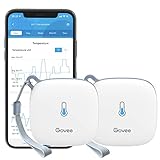
Govee WiFi Thermometer Hygrometer H5179
Wi-Fi and Bluetooth Sensor with Display
The H5179 is the simplest way to get remote humidity alerts without buying a separate gateway. It connects directly to your home Wi-Fi and pushes readings and threshold alerts to the Govee Home app wherever you are, while a small on-device display shows the current temperature and humidity to anyone standing nearby. Govee rates it at plus or minus 3 percent RH and roughly half a degree Fahrenheit, and it keeps 20 days of detailed data online, with the option to export up to two years of history. That combination makes it the right pick for spaces you do not walk through daily. A crawl space, a finished basement you only use at weekends, a cabin that sits closed for weeks, or a parent's house where a dehumidifier failure would otherwise go unnoticed until the carpet smells. Getting a push notification when humidity crosses 60 percent is the whole point, and it is worth more than a slightly tighter accuracy spec in those settings. The trade-offs are the tolerance, which is a point wider than the ThermoPro models, and Wi-Fi reach. Basements and crawl spaces under concrete and ductwork can be dead zones, so check the signal where you plan to put it before trusting it with remote alerts. Once it is connected, it is the most useful hygrometer on this list for peace of mind.
Pros
- Wi-Fi sends readings and alerts to your phone from anywhere, no hub required
- Plus or minus 3 percent RH and about half a degree Fahrenheit rated accuracy
- Twenty days of detailed online data with export of up to two years
- Also connects over Bluetooth for setup and local reading
- On-device display for anyone in the room without the app
Cons
- Wider humidity tolerance than the ThermoPro picks
- Wi-Fi reach into a concrete basement or crawl space is not guaranteed
The Bottom Line
The hygrometer to buy for a space you do not visit every day, such as a vacation home, a rental basement or a crawl space under a slab-on-grade addition.
SensorPush HT1 Wireless Thermometer Hygrometer
Bluetooth Data Logger, Optional Wi-Fi Gateway
SensorPush built its reputation with humidor owners, guitar players and hobbyists who care about humidity to the percent, and the HT1 reflects that audience. It is a small screenless sensor that records temperature and humidity every minute and stores more than two weeks of readings on board, so if your phone is out of range for a few days nothing is lost; it all syncs the next time you open the app. The Bluetooth range is long, rated to about 325 feet line of sight, and adding the optional G1 Wi-Fi gateway turns it into a remote monitor with alerts and cloud history. What we appreciate most is that SensorPush publishes both typical and maximum error. Humidity is rated at plus or minus 3 percent typical and 4.5 percent maximum between 20 and 80 percent RH at room temperature, which is a more honest disclosure than a single headline number. In practice ours tracked the salt test closely. The minute-by-minute resolution is its real strength. You can see exactly how long a dehumidifier takes to pull a basement back after a wet day, or how fast a closed crawl space climbs when the vent fan stops. The lack of a display is the obvious drawback for general household use, and the gateway adds cost. For serious logging in small or awkward spaces, though, it is the best tool here.
Pros
- Logs every minute and stores more than two weeks of data on the sensor
- Long Bluetooth range of up to about 325 feet line of sight
- Pairs with the optional G1 Wi-Fi gateway for remote alerts and cloud history
- Small enough to fit in a humidor, instrument case or crawl space vent
- Clear, published accuracy specs including both typical and maximum error
Cons
- No screen, so every reading goes through the app
- Remote alerts require buying the gateway separately
The Bottom Line
The logger for people who want dense, dependable data and are happy to read it on a phone rather than a screen.

AcuRite Pro Accuracy Indoor Temperature and Humidity Monitor 01083
Standalone Display with Alarms
AcuRite's Pro Accuracy monitor sits between the basic ThermoPro TP50 and the smart sensors, and it earns its place with two features most standalone hygrometers lack. The first is a manual calibration setting. If a salt test shows the unit reading 72 percent instead of 75, you can enter the offset on the device and every reading afterward is corrected, rather than doing the arithmetic in your head. The second is a programmable high and low humidity alarm that sounds on the unit, which is genuinely useful in a laundry room, a workshop or next to a basement dehumidifier with no app involved. AcuRite rates it at plus or minus 2 percent RH and half a degree Fahrenheit, measuring from 1 to 99 percent humidity, and it updates every ten seconds. It records daily and all-time highs and lows, so you can at least see the extremes even without a full log. It mounts on a tabletop stand, a wall hook or a magnet, which makes it easy to stick to a furnace duct or a metal shelf at the right height. It runs on two AAA batteries. The limitation is that an audible alarm is only useful if somebody hears it, and there is no history beyond the highs and lows. For a space you are in daily, it is a thoughtful, accurate standalone unit.
Pros
- Enhanced accuracy rating of plus or minus 2 percent RH and half a degree Fahrenheit
- Programmable high and low humidity alarms that sound on the unit itself
- Manual calibration setting, so a salt test offset can be entered directly
- Shows 24-hour and all-time highs and lows
- Tabletop, wall or magnet mounting
Cons
- No logging beyond the highs and lows, and no app
- Audible alarm only helps if someone is within earshot
The Bottom Line
The best choice if you want a screen, an alarm and the ability to correct the reading yourself, without a phone in the loop.

Govee Bluetooth Hygrometer Thermometer H5075
Bluetooth Sensor with Display
The H5075 is Govee's Bluetooth hygrometer, and it offers most of what makes a smart sensor useful for very little money. There is an LCD on the front for quick reading, and the Govee Home app pulls data over Bluetooth, displays 20 days of graphs and lets you export up to two years of history as a CSV file. That export is a small detail that matters if you want to hand a dehumidifier installer or a mold remediator real numbers rather than a vague description. Govee rates humidity at plus or minus 3 percent RH and temperature to a fraction of a degree, and our unit read within that range on the salt test. The honest comparison is with the ThermoPro TP357, which costs about the same, has a slightly tighter humidity spec and keeps a longer history in its app. We ranked the ThermoPro higher for that reason. But the H5075 is still an easy recommendation, particularly if you already have Govee devices or plan to add the Wi-Fi H5179 elsewhere in the house, since all of them share one app and one set of alerts. Like any Bluetooth-only sensor, it can only alert you when your phone is within range, so it suits living spaces better than places you rarely visit. As a way to start logging humidity cheaply, it is hard to fault.
Pros
- Budget price for a sensor with app logging and alerts
- Twenty days of graphs on the device and CSV export of up to two years
- Plus or minus 3 percent RH with fine temperature accuracy
- Clear LCD for quick reading without the phone
- Works in the same Govee app as the H5179 if you add Wi-Fi sensors later
Cons
- Bluetooth only, so no alerts when you are away from home
- Humidity tolerance is a point wider than the ThermoPro TP357
The Bottom Line
A very good value logger; the TP357 is slightly more accurate, but the H5075 is a sensible pick if you already use the Govee app.
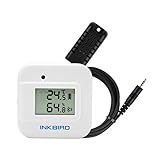
Inkbird IBS-TH2 Bluetooth Thermometer Hygrometer
Bluetooth Logger with Display, Wi-Fi Gateway Optional
Inkbird comes from the fermentation and grow-room world, and the IBS-TH2 shows that heritage in the details. Its temperature range extends down to minus 40 degrees, which matters in an unheated garage, a vented crawl space in January or a cold storage room, and it lets you set a calibration offset directly in the app after a salt test, so the corrected value appears everywhere, including in exported data. It stores up to 3,000 readings on the device and exports them from the app, and humidity is rated at plus or minus 3 percent RH with temperature to a fraction of a degree. Bluetooth reaches roughly 98 feet, shorter than the long-range sensors on this list, but pairing it with the IBS-M2 Wi-Fi gateway removes the distance limit and adds remote alerts. There is also a small LCD, so it works as a normal hygrometer when the app is closed. The weak point is battery life. Inkbird quotes roughly three to six months on two AAA batteries depending on how often you set it to sample, which is much shorter than the ThermoPro and Govee units and means a sensor in a crawl space needs a visit a few times a year. If you need cold-weather range or like correcting readings in the app, it is a smart pick. For a heated living space, the TP357 is the easier choice.
Pros
- Temperature range down to minus 40 degrees, useful for unheated garages and crawl spaces
- Calibration offset can be set in the app after a salt test
- Stores up to 3,000 data points that export from the app
- Pairs with Inkbird's IBS-M2 Wi-Fi gateway for remote monitoring
- Plus or minus 3 percent RH with fine temperature accuracy
Cons
- Battery life of roughly three to six months, depending on sampling rate
- Bluetooth range is shorter than the ThermoPro and SensorPush sensors
The Bottom Line
Worth choosing for unheated spaces and for anyone who wants app-based calibration, provided you are happy to change batteries a few times a year.
4. Target Humidity by Room, Basement and Crawl Space
The EPA recommends keeping indoor humidity below 60 percent and ideally between 30 and 50 percent. That band is a compromise between two sets of problems. Below 30 percent, skin, sinuses and wood floors dry out and static builds. Above 50 percent, dust mites thrive, and once humidity stays above 60 percent for long stretches, mold and mildew get a foothold on cool surfaces.
| Space | Target RH | Why |
|---|---|---|
| Living areas, bedrooms | 30 to 50% | Comfort, dust mite control |
| Nursery | 40 to 50% | Comfortable breathing without condensation |
| Basement | Under 50%, never over 60% | Mold, musty odor and wood moisture |
| Crawl space | Under 60%, ideally 50 to 55% | Joist rot, mold, insulation damage |
| Winter, cold climates | 30 to 40% | Prevents window condensation |
| Guitar or piano room | 45 to 55% | Stable wood movement |
| Cigar humidor | 65 to 70% | Keeps tobacco from drying or molding |
Basements deserve particular attention. They sit against cool soil, so warm, humid summer air that enters them cools and its relative humidity rises, sometimes to the point of condensation on walls and ductwork. A basement that reads 58 percent in the middle of the room can be well above 70 percent against the foundation wall. That is why we suggest aiming for 45 to 50 percent in the open air of the basement, which leaves a margin at the cold surfaces.
If a dehumidifier is doing the work, the hygrometer tells you whether its setting matches reality. Built-in humidistats are often off by 5 percent or more because they sit in the machine's own airflow. Set the dehumidifier, check the hygrometer a few feet away, and adjust; our guide on what a basement dehumidifier should be set at explains how to find the setting that actually holds the room at target.
5. How to Calibrate a Hygrometer With the Salt Test
The salt test is the cheapest calibration method there is, and it is surprisingly precise. A saturated solution of ordinary table salt holds the air above it at about 75 percent relative humidity across normal room temperatures. Seal a hygrometer in with it long enough and the reading should settle at 75. Whatever it shows instead is your error.
Put a few tablespoons of plain salt in a bottle cap or small dish and add just enough water to make a damp paste, like wet sand, with undissolved crystals still visible. Place the dish and the hygrometer together in a large zip-top bag or an airtight food container, making sure the salt cannot spill onto the sensor. Seal it and leave it somewhere with a steady temperature, away from sun and heating vents.
THE RULE
Wait at least 8 hours, ideally overnight, before reading it.
The air in the bag needs time to reach equilibrium and the sensor needs time to settle. Reading it after an hour usually shows a number still climbing, which leads people to apply the wrong correction.
If the hygrometer reads 75, it is accurate at that point. If it reads 72, it is reading 3 percent low, and you should add 3 to every reading. Some models, including the AcuRite 01083 and the Inkbird IBS-TH2, let you enter that offset so the display corrects itself. For others, a small piece of tape on the back with the correction written on it works.
Keep in mind that a salt test checks one point. A sensor that is 3 percent low at 75 percent is probably close to 3 percent low at 50, but not always exactly. If you need precision across a range, two-way humidity calibration packs at different levels are sold for exactly this purpose. For a home, a yearly salt test is plenty.
6. Smart vs Standalone Hygrometers
A standalone hygrometer is a sensor and a screen. You look at it, it tells you the humidity. Most also record the high and low since you last reset them. They are cheap, the batteries last a long time, and there is nothing to pair or update. Their weakness is that they only help when someone looks.
Bluetooth models add a log. The sensor stores readings, and when your phone comes within range the app downloads them and draws a graph. That turns a snapshot into a story: you see that the basement hits 65 percent every afternoon when the sun heats the south wall, or that the bedroom climbs to 60 overnight with the door shut. Bluetooth alerts work only while your phone is nearby, which is fine for a house you live in.
Wi-Fi models, or Bluetooth sensors paired with a Wi-Fi gateway, send data to the cloud continuously and can alert you anywhere. That is the feature that prevents damage rather than documenting it. A dehumidifier that trips its breaker, a full bucket that stops the unit, a sump pit that starts to overflow: each shows up as a humidity climb, and a Wi-Fi sensor tells you within minutes instead of weeks.
Our rule of thumb: standalone units for rooms you are in every day, Bluetooth loggers for basements and bedrooms you want to understand, and Wi-Fi sensors for crawl spaces, second homes and anywhere a problem could run for days before anyone notices. Most households are well served by one of each type in the right places.
7. Why Logging Beats a Single Reading
Humidity in a house moves constantly. It rises with cooking, showers, laundry, breathing and rain; it falls when the air conditioner or dehumidifier runs and when dry winter air leaks in. Glancing at a screen once a day catches a random point on that curve, and the random point is usually the least useful one.
Mold does not care about the average you see at breakfast. It cares about how many hours a surface spends damp. A basement that reads 50 percent every time you walk past it but sits at 68 percent every night while the dehumidifier cycles off is a basement with a mold problem waiting to happen. Only a log shows that pattern.
Logs also make troubleshooting fast. After you add a dehumidifier, the graph shows how long it takes to pull the room down and whether it holds. After you seal a basement wall or regrade a downspout, comparing the week after the next heavy rain with the week before tells you whether it worked. When a contractor asks how bad the humidity gets, you can show them rather than guess.
How much history you need depends on the question. Twenty days is enough to see daily patterns and the effect of a change. A year shows seasons, which is how you learn that the basement only needs the dehumidifier from May to October. Exporting to a spreadsheet, which the Govee, SensorPush and Inkbird apps support, lets you keep records indefinitely.
8. Where to Put a Hygrometer
Put the hygrometer where people live and breathe, at roughly shoulder or chest height, in the middle of the space you care about. That gives the most representative reading. Avoid direct sun, the top of a refrigerator or TV, and anywhere near a heat register, a humidifier's mist, a dehumidifier's exhaust or a bathroom door, all of which create local conditions that do not reflect the room.
Keep it off exterior walls in winter. The inside surface of an outside wall is cooler than the room, so a hygrometer mounted there reads higher humidity than the air a few feet away. That can be useful if you are hunting condensation, but it will make the room seem damper than it is.
In a basement, place the main hygrometer in the open area, away from the dehumidifier by at least ten feet, so you are measuring the room and not the machine. If you want to know how damp the cold surfaces get, a second sensor on a shelf near the foundation wall or in a closed storage room is informative. The gap between the two readings tells you how much margin your target really has.
For a crawl space, set the sensor on a block or hang it from a joist so it is not lying on the vapor barrier, and make sure you can reach it to change batteries. Wi-Fi or a gateway is almost essential here, because nobody checks a crawl space hygrometer in person often enough.
9. Using a Hygrometer in Basements and Crawl Spaces
Basements are where a hygrometer earns its money, because most basement moisture problems start as humidity rather than standing water. A persistent musty smell, efflorescence on block walls, rusting tool steel and cardboard that goes soft are all signs of air that stays too damp for too long. A hygrometer converts those signs into a number you can target.
Start by measuring for a week without changing anything. If the basement regularly exceeds 60 percent, it needs active dehumidification; if it sits between 50 and 60, ventilation and sealing may be enough. Our guide to basement moisture control lays out the order to tackle the sources, from gutters and grading to sealing and air movement.
If a dehumidifier is warranted, the hygrometer data tells you how big a unit you need. A basement that climbs 10 percent in a few hours after rain needs more capacity than one that creeps up slowly. Our roundup of the best dehumidifiers for basements compares units by real pint capacity, and a logged hygrometer is the best way to confirm the one you choose keeps up.
Crawl spaces follow the same rules with less margin, because they are usually colder, darker and closer to the soil. Keep them under 60 percent and ideally around 50 to 55 percent, and watch for spikes after rain or when summer air enters through vents. Encapsulated crawl spaces with a dehumidifier should hold a very steady line on the graph; a sawtooth pattern means something is leaking in.
Humidity and soil gas often share the same entry points, so if you are already monitoring a basement, it is worth adding a radon detector too. Several of the better radon monitors log humidity as well, and seeing both rise together is a good clue about where the house is breathing.
10. Humidity Through the Seasons
Summer is the humid season in most of the country. Warm air holds a lot of moisture, and when it reaches a cool basement it cools and its relative humidity climbs. This is when basement dehumidifiers work hardest and when a hygrometer with alerts is most valuable. Opening basement windows on a muggy day usually makes things worse, not better, and a hygrometer will prove it within an hour.
Winter flips the problem. Cold outdoor air holds very little moisture, so once it leaks in and warms up, indoor relative humidity drops, often below 30 percent in heated homes. The exception is basements that stay damp from ground moisture, and houses where the problem is condensation on cold windows. In cold climates, keeping living areas at 30 to 40 percent in winter avoids window condensation without drying everyone out.
That seasonal shift is why many people wonder whether to keep the dehumidifier running in winter. The answer depends on what your hygrometer says, not the calendar; our guide on whether you need a dehumidifier in winter walks through the readings that justify it. Many basements that need 24-hour dehumidification in July can switch it off from December to March.
Spring and fall are the transition seasons, and they are where a logged hygrometer pays for itself. The graph shows exactly when the basement starts climbing in spring, so you can start the dehumidifier before the musty smell arrives, and when it settles in fall, so you are not paying to run a machine that has nothing to remove.
11. Common Mistakes to Avoid
Trusting the dehumidifier's own humidistat
The sensor inside a dehumidifier sits in the machine's own airflow and is often 5 percent or more off. Setting it to 50 and assuming the room is at 50 is how basements stay musty. Place a separate hygrometer several feet away and adjust the dehumidifier until the hygrometer, not the machine, shows your target.
Skipping the salt test
A new hygrometer can arrive reading 3 to 5 percent off, and all of them drift with age. An overnight salt test in a sealed bag costs almost nothing and tells you exactly how far off yours is. Do it when the hygrometer arrives and once a year, and write the correction on the back.
Reading it right after moving it
Carrying a hygrometer from a warm room to a cool basement changes both the air and the sensor temperature. Readings can take 20 to 30 minutes to settle. Setting it down and reading it immediately gives a number that is often several percent wrong, usually in the reassuring direction.
Mounting it on a cold exterior wall
The inside face of an exterior wall is cooler than the room, so humidity measured right against it reads higher. A hygrometer there makes a room seem damper than it is and can lead to overdrying. Mount it on an interior wall or shelf, away from sun, vents and appliances.
Using an analog dial for real decisions
Dial hygrometers are attractive and often wildly inaccurate, commonly 5 to 10 percent off and hard to calibrate. They are fine as decoration but not for deciding whether a basement needs a dehumidifier or a crawl space is growing mold. A budget digital unit is far more reliable for less money.
12. Frequently Asked Questions
What is the most accurate type of home hygrometer?
A digital hygrometer with a capacitive sensor rated at plus or minus 2 percent is the most accurate type most homeowners will use. Analog dial models are far less reliable. Accuracy also depends on calibration, so salt test any hygrometer when it arrives and once a year, and apply any offset you find to its readings.
What humidity should a basement be?
Aim for below 50 percent in the open basement and never let it sit above 60 percent for long. Because the foundation walls are cooler than the room, humidity right against them runs higher than the middle of the space, so a 45 to 50 percent target leaves a safety margin against condensation and mold on cold surfaces.
How do I know if my hygrometer is accurate?
Use the salt test. Mix table salt with a little water into a damp paste, seal it in a bag or container with the hygrometer and leave it overnight at a steady temperature. The air should settle at 75 percent. The difference between 75 and what your hygrometer shows is its error, which you can add or subtract going forward.
Is a smart hygrometer worth it?
For basements, crawl spaces and any space you do not check every day, yes. Logging reveals overnight spikes that a glance at a screen misses, and Wi-Fi alerts catch a failed dehumidifier or a wet crawl space within minutes. For a bedroom or living room you are in daily, a simple standalone model is usually enough.
How many hygrometers do I need?
Humidity varies by floor and room, so one per level is a sensible minimum: one in the basement, one on the main floor and one in a bedroom. Add one in the crawl space if you have one. Budget digital units are inexpensive enough that measuring several spaces costs less than one mid-range smart sensor.
Can a hygrometer detect mold?
No. A hygrometer measures the moisture in the air, not mold itself. It is still one of the best mold prevention tools, because mold needs sustained humidity above about 60 percent on a surface to grow. Keeping your readings in the 30 to 50 percent range removes the conditions mold depends on.
How often should I replace a hygrometer?
There is no fixed schedule. Check it with a salt test each year, and if the error keeps growing or becomes erratic between tests, replace it. Budget digital sensors often stay usable for several years in normal rooms. Units kept in very damp basements or crawl spaces tend to drift faster and may need replacing sooner.
Related Humidity & Basement Guides
Buyer's Guide
Best Dehumidifiers for Basements
Basement dehumidifiers compared by real capacity, drainage options and how well they hold a target humidity.
Guide
What to Set a Basement Dehumidifier At
The setting that actually holds a basement at a safe humidity, and why the dial number is not the room number.
Buyer's Guide
Best Radon Detectors
Seven radon monitors and test kits compared, with the EPA action levels explained and where to place a detector.
The Bottom Line
For most homes, the ThermoPro TP357 is the best hygrometer: accurate to within 2 percent, a screen for quick checks, and a year of app history that shows what happens overnight. If you just need an honest number in several rooms, the ThermoPro TP50 does that for very little. For crawl spaces and second homes, the Govee H5179 earns its place by alerting you from anywhere.
Whichever you choose, salt test it when it arrives, place it away from vents and cold walls, and use its readings rather than your dehumidifier's dial. Keep living spaces between 30 and 50 percent and basements under 50, and you will have removed the conditions that musty smells and mold depend on.
More in Home & Indoor Air Quality
Guides in this category that pair with what you just read.
About the Author
Alex Rivers, Home Improvement Editor
Alex has spent over a decade working on residential and light commercial property maintenance, and now tests every tool, coating and machine that appears in these guides personally.