Best Impact Drivers
We drove 3-inch framing screws, half-inch lags and self-tapping metal screws with seven drivers, and found that the battery you already own matters more than the torque number on the box.
Alex Rivers
Home Improvement Editor
Last Updated
September 29, 2026
In This Guide
Every current brushless impact driver from a major brand will drive a 3-inch deck screw without complaint. The spec-sheet war over 1,800 versus 2,000 in-lbs is mostly marketing, and the numbers are not even measured the same way from one brand to the next. What actually separates these tools is the battery platform, the speed modes, the size of the head and how well they control small screws. Here is how to choose on those terms.
Our Picks at a Glance
- Best Overall: Milwaukee M18 FUEL 1/4-Inch Hex Impact Driver (2953-20) — 18V Brushless, 4-Mode Drive Control
- Best for DeWalt Owners: DeWalt ATOMIC 20V MAX Brushless 1/4-Inch Impact Driver (DCF850B) — 20V MAX Compact Brushless, 3-Speed
- Best Control: Makita 18V LXT Brushless Quick-Shift Mode 4-Speed Impact Driver (XDT16Z) — 18V LXT Brushless, 4-Speed with T-Mode
- Best 12V Compact: Milwaukee M12 FUEL 1/4-Inch Hex Impact Driver (3453-20) — 12V Compact Brushless, 4-Mode
- Best Value: Ryobi ONE+ HP 18V Brushless 4-Mode 1/4-Inch Impact Driver (PBLID02B) — 18V ONE+ HP Brushless, 4-Mode
- Best for Bosch Owners: Bosch 18V Connected-Ready 1/4-Inch Hex Impact Driver (GDR18V-1860CN) — 18V Brushless, 3-Speed, Connected-Ready
- Quietest: Makita 18V LXT Brushless Oil-Impulse 3-Speed Impact Driver (XST01Z) — Hydraulic Oil-Impulse, 18V LXT
1. How We Picked These Impact Drivers
We started with every brushless 1/4-inch hex impact driver currently sold by the major cordless platforms — Milwaukee, DeWalt, Makita, Ryobi, Bosch and Ridgid — and narrowed the list to tools that are widely available, current rather than discontinued, and sold as a bare tool so you can run them on batteries you already own. We left out no-name budget drivers with inflated torque claims. A 3,000 in-lb figure from a brand with no service network is not a number anyone can check, and a driver with no platform behind it is a dead end the day its battery fails.
Each driver did the same set of jobs: 3-inch construction screws into doubled 2x10 framing, 1/2 x 6-inch lag screws into a 4x4 post with a pilot hole, 1-1/4-inch cabinet screws into maple face frames, and self-tapping screws into 20-gauge steel stud. The first two jobs show whether a driver has enough power. The last two show whether it has enough control, and that is where the real differences between these tools appeared.
We also paid attention to things that never show up in torque charts: how far the trigger travels before the anvil starts hammering, whether the speed-mode button is easy to hit by accident, how the tool balances with a 2.0Ah pack versus a 5.0Ah pack, and whether the LED lights the screw or the back of your hand. On a tool you pick up hundreds of times during a deck build, those details decide whether you enjoy using it.
We did not rank on price alone, and we did not give a pick to a driver just because it posts the biggest number. If you already own batteries for one of these platforms, the right answer is almost always that platform's driver, so our picks are organised to let you find yours quickly. Ridgid's brushless 3-speed driver is a solid tool with a strong service agreement, but it is sold mainly through Home Depot, so it is not among the cards below.
2. Pick the Battery Platform First
An impact driver is usually the second cordless tool anyone buys, after a drill, and that makes it a platform decision rather than a tool decision. Batteries do not cross brands. A Milwaukee M18 pack will not fit a DeWalt 20V MAX tool, and third-party adapters that claim otherwise can void warranties and bypass the protection electronics that stop a pack from overheating. Whatever you buy here, you are also choosing what your saw, your sander and your next drill will run on.
If you already own a drill on one of these platforms, buy the bare impact driver for it and stop reading spec sheets. The gap between the best and the fourth-best 18V driver on this list is far smaller than the cost of a second set of batteries and a second charger. If you are starting from nothing, our cordless tool brand rankings go through each platform in turn, and the Milwaukee vs DeWalt comparison covers the two systems most professionals end up choosing between.
The platform also decides what you can add later. A homeowner who will eventually want a string trimmer, a leaf blower and a shop vacuum is better served by a platform with a broad, affordable catalog than by the one with the fastest driver. Ryobi ONE+ wins that argument on breadth and price. Milwaukee and DeWalt win it on heavy-duty tools and the depth of their professional ranges. Makita sits between them, with especially good compact tools and a very large 18V LXT line.
There is one more reason to think about the platform first, and it is the circular saw. If a deck, a fence or a shed is the reason you are buying an impact driver, a cordless saw is probably next on the list, and it draws far more current than any driver. Read our best cordless circular saw guide before you commit, because the saw is where battery capacity and platform strength actually start to matter.
THE RULE
Own batteries already? Buy that brand's driver.
The performance gap between the top 18V drivers is smaller than the cost of starting a second battery system. Only shop across brands if you are starting from zero.
3. Our 7 Top Picks
These are the seven drivers we would buy, organised so you can find the right one for the batteries you already own. The Milwaukee M18 FUEL is the best all-round driver we tested, but DeWalt, Makita, Ryobi and Bosch owners are all well served by their own platform's pick, and there is no reason to switch systems for a driver. We have also included a 12V compact and a quieter hydraulic driver, because for some people those are the better tools rather than compromises.

Milwaukee M18 FUEL 1/4-Inch Hex Impact Driver (2953-20)
18V Brushless, 4-Mode Drive Control
Milwaukee's M18 FUEL driver earns the top spot because it does the heavy jobs faster than most of the field without being clumsy at the light ones. Milwaukee rates it at 2,000 in-lbs of torque, 3,900 RPM and 4,400 impacts per minute, and in our driving it sank half-inch lags into a 4x4 post noticeably quicker than most of the other drivers here. Those figures are Milwaukee's own, and as we explain below they do not compare directly with other brands' claims, but the speed under load was obvious on the bench. What keeps it from being a blunt instrument is the 4-Mode Drive Control. The first mode is slow enough for cabinet hardware, and the dedicated self-tapping screw mode slows down automatically as a screw punches through steel, which prevents the stripped holes and snapped screws that plague metal-stud work. The body is compact for a full-power driver at about 4-1/2 inches long and around 2.2 pounds bare, and it balances well on a 2.0Ah or 3.0Ah pack. The honest caveat is price: this is a premium tool, and if you already own DeWalt, Makita or Ryobi batteries, their own drivers get close enough that switching platforms for it makes no sense.
Pros
- Milwaukee rates it at 2,000 in-lbs, 3,900 RPM and 4,400 IPM, the fastest no-load speed among the conventional drivers here
- 4-Mode Drive Control includes a self-tapping screw mode that slows as the screw breaks through steel
- Sank half-inch lags noticeably quicker than most of the field in our testing
- Around 2.2 lb bare and about 4-1/2 inches long, compact for a full-power 18V driver
- Runs on the whole M18 battery line, one of the largest professional platforms
Cons
- Priced at the premium end of the category, even as a bare tool
- Changing modes takes a deliberate press at the base, slower mid-job than Makita's quick-shift button
The Bottom Line
The best all-round impact driver we tested, and the one to buy if you are on M18 or choosing a professional platform from scratch.
DeWalt ATOMIC 20V MAX Brushless 1/4-Inch Impact Driver (DCF850B)
20V MAX Compact Brushless, 3-Speed
DeWalt sells two very similar brushless drivers, the DCF887 and the Atomic DCF850, and for most buyers the Atomic is the better pick. Both are rated by DeWalt at 1,825 in-lbs, 3,250 RPM and 3,800 impacts per minute, with three speed settings, but the DCF850 packs that into a head under 4 inches long and around 2.1 pounds bare. In practice that shorter body is what you notice. It fits between joists and inside base cabinets where longer drivers have to go in at an angle, and it balances nicely on a compact 2.0Ah pack. In our testing it drove 3-inch construction screws at a pace we could not tell apart from the Milwaukee, and it handled half-inch lags with pilot holes, a little more slowly. The three speeds are straightforward: low for small screws, medium for general driving, high for long fasteners. What it lacks compared with Milwaukee and Makita is a specialised mode for self-tapping screws or a soft-start assist, so metal work takes a lighter finger on the trigger. The DCF887 adds DeWalt's Precision Drive mode for small fasteners and is worth considering if you do a lot of cabinetry, but the Atomic is the one we would carry. It runs on all DeWalt 20V MAX packs, including FlexVolt.
Pros
- Under 4 inches long, the shortest 18V/20V-class driver on this list
- DeWalt rates it at 1,825 in-lbs, 3,250 RPM and 3,800 IPM from a tool weighing about 2.1 lb bare
- Three speed settings cover everything from cabinet screws to lags
- Runs on every DeWalt 20V MAX battery, including FlexVolt packs
- Handled our full test set, including pilot-drilled half-inch lags
Cons
- No specialised self-tapping or assist mode, only three plain speeds
- A little slower on long lags than the Milwaukee M18 FUEL
The Bottom Line
The best DeWalt driver for most people: near full-size power in a body short enough for work between joists.

Makita 18V LXT Brushless Quick-Shift Mode 4-Speed Impact Driver (XDT16Z)
18V LXT Brushless, 4-Speed with T-Mode
The Makita XDT16 is not the most powerful driver on this list and does not try to be. Makita rates it at 1,600 in-lbs, with four speeds running from 0-1,100 up to 0-3,600 RPM and up to 3,800 impacts per minute. What it offers instead is control. The four speed settings cover a wider range than most rivals, and the lowest is gentle enough to set cabinet screws and hinge screws without driving them through. The standout is T-mode, which automatically drops speed the moment the impact mechanism engages. On self-tapping screws into steel stud it prevented the stripped holes we got with other drivers set too high, and it was nearly as useful for driving screws flush into softwood. The quick-shift button sits near the trigger, so you can change speeds with a thumb without looking; it is fast once you know it and easy to bump before you do. On half-inch lags it was among the slower drivers here, and if heavy fastening is most of your work the Milwaukee or DeWalt suits better. Makita has since added the XDT19, which keeps the four speeds and adds an assist mode and reverse auto-stop, but the XDT16 remains widely available and is often the cheaper of the two.
Pros
- Four speed settings from 0-1,100 up to 0-3,600 RPM give the finest control of any driver here
- T-mode drops speed the moment impacting starts, preventing stripped threads on self-tapping screws
- Quick-shift button near the trigger changes speed without looking
- Compact 4-9/16-inch head length
- Runs on Makita's large 18V LXT battery line
Cons
- Rated at 1,600 in-lbs, lower than rivals, and slower on long lags in our testing
- Speed button is easy to bump by accident until you are used to it
The Bottom Line
The driver for people who drive more small screws than lags: precise, compact and very hard to over-drive with.

Milwaukee M12 FUEL 1/4-Inch Hex Impact Driver (3453-20)
12V Compact Brushless, 4-Mode
The M12 FUEL is the driver we would hand to most homeowners who do not build decks, and it is the one many tradespeople carry in a pouch alongside a bigger 18V kit. Milwaukee rates it at 1,500 in-lbs and 3,600 RPM, and it weighs about 2 pounds with a 2.0Ah battery, which is noticeably lighter than any 18V driver once a pack is fitted. That weight difference is the point. Overhead, inside cabinets and on ladders, the M12 is simply easier to hold and control for long periods. In our testing it drove 3-inch screws into framing with no trouble and managed half-inch lags with pilot holes, though slowly, and it ran down a 2.0Ah pack faster than the 18V drivers did on the heavy jobs. It gets the same 4-Mode Drive Control as its M18 sibling, including the self-tapping screw mode, and the tri-LED ring around the collet puts the light on the screw. The caveat is the platform. If you already own M18, adding M12 means a second set of batteries and chargers, which is worthwhile for professionals and harder to justify for occasional users. If you are starting fresh and your work is mostly assembly and repair, 12V is a sensible place to begin.
Pros
- About 2 lb with a 2.0Ah battery, far lighter in the hand than any 18V driver once a pack is fitted
- Rated at 1,500 in-lbs and 3,600 RPM, enough for everything in our test except fast lag driving
- 4-Mode Drive Control with a dedicated self-tapping screw mode
- Tri-LED ring lights the fastener rather than casting a shadow
- Part of the M12 line, one of the deepest 12V platforms available
Cons
- Slow on half-inch lags, and small packs run down quickly on heavy work
- Means a second battery platform if you already own M18
The Bottom Line
The best impact driver for cabinet installers, electricians and homeowners who value light weight over peak power.
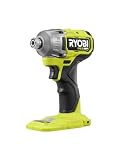
Ryobi ONE+ HP 18V Brushless 4-Mode 1/4-Inch Impact Driver (PBLID02B)
18V ONE+ HP Brushless, 4-Mode
Ryobi's ONE+ HP driver is the clearest illustration of why torque numbers do not compare across brands. Ryobi rates it at 2,200 in-lbs, more than Milwaukee claims for its flagship, yet in our lag-screw test it was clearly slower than both the Milwaukee M18 FUEL and the DeWalt Atomic. That is less a criticism of the tool than of the number. Its top speed of 2,900 RPM is the lowest of the conventional drivers here, and speed under load is what finishes long fasteners. For the work most homeowners actually do, none of that matters much. It drove 3-inch deck screws steadily all afternoon, handled pilot-drilled lags, and its four modes are genuinely useful: three speeds at 0-850, 0-2,000 and 0-2,900 RPM, plus an Assist mode that starts slowly until the screw bites and then ramps up, which reduces cam-out on the first few turns. The real reason to buy it is the platform. ONE+ batteries run a huge range of tools, including mowers, trimmers, blowers and household gadgets, and the HP brushless tools close much of the gap with the pro brands at a much lower price. If you already own ONE+ batteries, this is the driver to buy, bare.
Pros
- Brushless HP motor with a claimed 2,200 in-lbs and up to 4,000 IPM
- Three speeds plus an Assist mode that starts slowly until the screw bites
- Runs on the huge ONE+ battery line that also powers yard and household tools
- Priced well below the professional brands
- Drove deck screws and pilot-drilled lags steadily in our testing
Cons
- Slower on long lags than the Milwaukee and DeWalt despite the higher printed torque
- Top speed of 2,900 RPM is the lowest of the conventional drivers here
The Bottom Line
The best value impact driver for homeowners, and an easy choice for anyone already on ONE+.
Bosch 18V Connected-Ready 1/4-Inch Hex Impact Driver (GDR18V-1860CN)
18V Brushless, 3-Speed, Connected-Ready
Bosch's GDR18V-1860CN is a capable driver that rarely gets the attention of the big three. Bosch rates it at 1,860 in-lbs and up to 4,100 impacts per minute, with three speeds topping out at 1,100, 2,300 and 3,400 RPM. In our driving it sat comfortably in the middle of the pack: quick on construction screws, competent on lags and smooth in its low setting for smaller fasteners. The most useful extra is the auto bolt-release function, which slows the driver as a bolt or screw comes free in reverse, so the fastener stops at the tip of the bit instead of dropping off it. The connected-ready feature lets you fit an optional Bluetooth module and adjust speed and mode settings from a phone app. That is handy for tradespeople who want a custom mode for a specific fastener and irrelevant to most homeowners, which is why we would not pay extra for it. The body is a little long at about 4-7/8 inches and heavier than the DeWalt at about 2.4 pounds bare. The bigger question is the platform. Bosch 18V is well built and consistent across its tools, but its US catalog is smaller than Milwaukee's or DeWalt's. Buy it if you already own Bosch batteries.
Pros
- Bosch rates it at 1,860 in-lbs and up to 4,100 IPM
- Three speeds topping out at 1,100, 2,300 and 3,400 RPM
- Auto bolt-release mode slows the driver as a fastener comes free in reverse
- Connected-ready: an optional module lets you customise modes from a phone
- Compatible with all Bosch 18V batteries
Cons
- About 2.4 lb bare and 4-7/8 inches long, bulkier than the DeWalt Atomic
- Bosch's 18V catalog is smaller in the US than Milwaukee's or DeWalt's, and the connectivity module costs extra
The Bottom Line
A strong, well-controlled driver that makes sense if you already own Bosch 18V batteries, less so as a reason to start the platform.
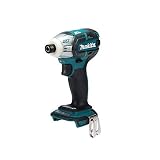
Makita 18V LXT Brushless Oil-Impulse 3-Speed Impact Driver (XST01Z)
Hydraulic Oil-Impulse, 18V LXT
The XST01Z is here because it is a different tool, not a weaker version of the others. Instead of a steel hammer striking a steel anvil, it uses a sealed oil chamber to deliver its pulses, and the difference in noise is immediate. Makita claims up to 30 percent less noise than a conventional impact driver, and working inside a finished room we found it far less tiring over a long session. The pulses are also softer, which makes it easy to set screws flush in trim, cabinet backs and drywall without overdriving. The trade-off is plain in the numbers. Makita rates it at 355 in-lbs of torque, with three speeds up to 3,200 RPM and up to 2,700 impulses per minute, against 1,500 to 2,000 in-lbs for the conventional drivers here. It drove 2-1/2-inch screws into framing, slowly, and it is not a tool for lag screws, ledger boards or long structural fasteners. The Quick-Shift mode helps prevent stripping on self-tapping screws, and Makita's Extreme Protection Technology adds dust and water resistance. For cabinet installers, electricians working in occupied homes and anyone who does a lot of indoor assembly, it is a pleasure to use. For a homeowner buying a single driver, a conventional model on its low setting is more versatile.
Pros
- Oil-impulse mechanism is far quieter than a conventional hammer-and-anvil driver
- Smooth pulses make it easy to set screws flush in trim and cabinetry
- Three speeds up to 3,200 RPM plus Quick-Shift mode to prevent stripping
- Extreme Protection Technology for dust and water resistance
- Runs on Makita 18V LXT batteries
Cons
- Rated at only 355 in-lbs, a fraction of the conventional drivers
- Not suitable for lag screws or long structural fasteners
The Bottom Line
The driver for indoor finish work where noise matters, and a second driver rather than a first for almost everyone else.
4. Torque Figures, and Why They Don't Compare
Impact drivers are sold on torque, quoted in inch-pounds, and the numbers look precise: 1,500, 1,825, 2,000, 2,200. The problem is that there is no common test behind them. Each brand measures peak fastening torque its own way, with different joints, different fasteners, different battery packs and different rules for when the reading is taken, and then publishes the best number its method produces. Comparing a Milwaukee figure with a Ryobi figure is comparing the results of two different tests.
That is how a mid-priced Ryobi ONE+ HP driver can claim 2,200 in-lbs while Milwaukee's flagship M18 FUEL claims 2,000, and how Ridgid's 3-speed driver can claim more than either. None of those figures is dishonest, exactly, but none of them tells you which tool will sink a lag faster. In our driving, the Milwaukee and DeWalt drivers finished half-inch lags quicker than the Ryobi despite their lower printed numbers, because speed under load and how well the battery delivers current matter as much as peak torque.
Within a single brand, torque figures are more useful. Milwaukee rates its M12 and M18 drivers on the same basis, so the gap between the M12 FUEL 3453-20 at 1,500 in-lbs and the M18 FUEL 2953-20 at 2,000 in-lbs does mean something. It is still smaller in practice than the numbers suggest, because most driving never comes close to the top of either tool's range.
The threshold that matters is lower than the marketing implies. A 3-inch deck screw into pressure-treated lumber needs a small fraction of any of these drivers' output. Structural screws and lags up to around half an inch are within reach of every conventional driver here, including the compact models, provided you drill pilot holes where the fastener maker calls for them. If you regularly drive bigger lags or break loose rusted bolts, what you need is an impact wrench with a square anvil, not a bigger impact driver.
| Driver | Claimed max torque | Max RPM | Max IPM |
|---|---|---|---|
| Milwaukee M18 FUEL 2953-20 | 2,000 in-lbs | 3,900 | 4,400 |
| DeWalt DCF850 Atomic | 1,825 in-lbs | 3,250 | 3,800 |
| Makita XDT16 | 1,600 in-lbs | 3,600 | 3,800 |
| Milwaukee M12 FUEL 3453-20 | 1,500 in-lbs | 3,600 | Not listed |
| Ryobi ONE+ HP PBLID02 | 2,200 in-lbs | 2,900 | 4,000 |
| Bosch GDR18V-1860CN | 1,860 in-lbs | 3,400 | 4,100 |
| Makita XST01Z (oil impulse) | 355 in-lbs | 3,200 | 2,700 |
Read that table the way you would read a car's top-speed figure: as a rough indication of class, not as a ranking. The only number in it that genuinely stands apart is the Makita oil-impulse driver's, and that is because it is a different kind of tool entirely, which we cover below.
5. RPM, IPM and Speed Modes
Two other numbers appear on every impact driver box. RPM is how fast the anvil spins with no load. IPM, impacts per minute, is how often the internal hammer strikes the anvil once the fastener resists. Higher RPM means a long screw spins in faster before it starts to bind; higher IPM means more frequent blows once it does. Together they explain most of the difference in driving speed you actually feel, and far more of it than peak torque does.
They also explain why an impact driver can be a clumsy tool for small screws. At full speed, a driver that spins at 3,900 RPM and hammers 4,400 times a minute will sink a cabinet screw straight through a face frame or snap a brass hinge screw before you can let go of the trigger. That is why speed modes exist, and why we weighted them heavily in our picks.
Most current drivers offer three or four modes. The lowest limits speed and impact rate for small fasteners; the highest is for lags and long structural screws. The useful extras are the specialised modes. Milwaukee's 4-Mode Drive Control includes a self-tapping screw mode that slows down as the screw breaks through steel. Makita's T-mode on the XDT16 reduces speed the moment the impact mechanism engages, to stop threads stripping. Ryobi's Assist mode on the PBLID02 starts slowly until the screw bites and then ramps up.
Where the mode button sits matters more than you might think. Some drivers put it at the foot of the handle, where it is easy to change deliberately and hard to hit by accident. Makita puts a quick-shift button near the trigger, which we found fast once we were used to it and easy to bump before we were. Whatever you buy, get into the habit of checking the mode before driving small screws into finished work, because the cost of forgetting is a ruined face frame.
WHAT THE NUMBERS MEAN
RPM
No-load spin speed: how fast a long screw runs in
IPM
Hammer blows per minute once the screw resists
in-lbs
Peak torque on each brand's own test, not comparable
3-4
Speed modes on most current brushless drivers
6. Do You Need an Impact Driver or a Drill?
An impact driver is not a replacement for a drill, and a lot of first-time buyers learn that on their first job. The driver's 1/4-inch hex collet only takes hex-shank bits, it has no clutch, and its hammering action is poor for drilling clean holes. It is a fastening tool first. For drilling, for mixing, or for driving screws that need to stop at an exact depth, a drill/driver with an adjustable clutch is still the right tool.
What the impact driver does better is sink long screws without twisting your wrist. A drill applies steady rotational force, and when a 3-inch screw binds, that force comes straight back through the handle. An impact driver turns the resistance into short hammer blows, so the reaction you feel is small and the screw keeps moving. On a deck or fence job with hundreds of screws, the difference in fatigue is dramatic. Our drill vs impact driver guide explains the mechanism in more detail.
Most people who do regular DIY end up owning both, often bought together as a two-tool combo kit, and that is frequently the cheapest way into a platform. If you do not yet own a drill, look at our best cordless drills before buying a driver on its own, because a kit containing both often costs little more than the drill by itself and usually includes a larger battery.
If you can only buy one tool and your work is mostly furniture assembly, hanging shelves and small repairs, buy the drill. If your work is mostly decking, framing, fencing or driving long screws into studs, buy the impact driver and borrow a drill for the occasional hole. The driver will manage light drilling with hex-shank bits in a pinch, particularly pilot holes for lags, but do not expect neat holes from it.
7. Hydraulic (Oil-Pulse) Drivers: Quieter, Not Stronger
A conventional impact driver works by spinning a steel hammer that strikes a steel anvil thousands of times a minute. That metal-on-metal contact is what makes impact drivers so loud: louder than most people expect, and loud enough that hearing protection is a sensible habit indoors. Hydraulic drivers, also called oil-pulse or oil-impulse drivers, replace the hammer and anvil with a sealed chamber of oil that transmits the pulses instead.
The result is a noticeably quieter tool with a softer, smoother feel. Makita's XST01Z is the most widely available example, and Makita claims up to 30 percent less noise than a standard impact driver. In our testing it was the driver we would reach for in an occupied house, a finished basement or any long session of cabinet and trim installation, where the constant hammering of a conventional driver wears you down by the afternoon.
The trade-off is torque. The XST01Z is rated at 355 in-lbs, a fraction of the conventional drivers on this list, and it is not a tool for lag screws or long structural fasteners. It drove 2-1/2-inch screws into framing adequately but slowly, and it has no business anywhere near a half-inch lag. The feel is also different: the pulses build more gradually, which is exactly why it is good at setting screws flush and less good at forcing stubborn ones home.
For most buyers, a hydraulic driver is a second driver rather than a first. Tradespeople who install cabinets, drywall or electrical boxes all day get the most from one. If you only own one impact driver, buy a conventional model, use its lowest speed mode for delicate work, and wear ear protection when you are driving in volume indoors.
8. Bare Tool vs Kit: What to Actually Buy
Almost every driver on this list is sold two ways: as a bare tool, with no battery or charger, and as a kit that adds one or two batteries, a charger and sometimes a bag. The model number usually tells you which is which. Milwaukee's -20 suffix means tool only, DeWalt uses a B suffix for bare tools, as in DCF850B, and Makita uses Z, as in XDT16Z. Kits carry different suffixes that indicate the batteries included.
If you already own batteries for the platform, the bare tool is almost always the better buy. Otherwise you are paying for another charger you do not need and batteries that may be smaller than the ones you already have. The bare tool is also the version to watch for promotions, because brands regularly discount it or bundle it free with a battery purchase, which can be the cheapest way to add both.
If you are starting a platform from nothing, a kit usually saves money over buying the tool, battery and charger separately, but check which batteries are in the box. Many impact driver kits ship with small 1.5Ah or 2.0Ah compact packs. Those suit a driver well, keeping it light and balanced, but they are the wrong batteries for a circular saw or an angle grinder. A drill-and-driver combo kit is often the best value start because it usually includes a larger pack.
One caution: marketplace listings sometimes describe a bare tool in a way that implies a battery is included, or show a battery in the photo that is not in the box. Read the model suffix and the listing's contents line before you buy. Our picks are listed by their bare-tool model numbers, so you can find the version that fits the batteries on your shelf.
9. Brushless Motors, Size and Weight
Every driver on this list uses a brushless motor, and at this point we would not recommend a brushed impact driver at any price. Brushless motors run cooler, get more work from each charge and let the electronics manage speed modes precisely, which is what makes features like T-mode and self-tapping modes possible. If you want the full explanation, our brushless vs brushed drill guide covers it, and the conclusion carries straight over to drivers.
Size matters more on an impact driver than on almost any other cordless tool, because you use it in tight places: between joists, inside cabinets, under sinks. Head length, measured from the back of the tool to the front of the collet, is the figure to compare. DeWalt's DCF850 Atomic is under 4 inches long, while the Milwaukee M18 FUEL and Makita XDT16 are both around 4-1/2 inches. Half an inch sounds trivial until you are driving a screw between two studs 16 inches apart.
Weight is dominated by the battery. A bare impact driver weighs roughly 2 to 2-1/2 pounds, and a 5.0Ah 18V pack can add nearly as much again on its own. For overhead work and all-day use, run the driver on a compact 2.0Ah pack and save the big batteries for saws. That single change makes more difference to fatigue than choosing one brand's driver over another.
The 12V class deserves more attention than it gets. Milwaukee's M12 FUEL 3453-20 weighs about 2 pounds with a 2.0Ah battery and drove every fastener in our test, managing the half-inch lags slowly. For cabinet installers, electricians and homeowners who mostly assemble and repair, a 12V driver is lighter, cheaper and entirely capable. The 18V drivers earn their place on decks, framing and lag-heavy work.
10. Bits, Sockets and Accessories That Matter
An impact driver is only as good as the bit in it, and the cheapest way to improve any driver on this list is to retire the ordinary screwdriver bits in your drawer. Standard bits are hard and brittle, and under the hammering of an impact driver they twist, chip and snap. Impact-rated bits have a torsion zone that flexes slightly with each blow, and they last many times longer for a small premium.
Buy bits that match your fasteners. Most modern deck and construction screws use Torx or star drives, which resist cam-out far better than Phillips, and many screw boxes include a bit that fits exactly. A worn bit is the main cause of stripped screw heads, so replace bits as soon as the tips start to round over rather than pushing harder.
For hex-head lags and bolts, use impact-rated socket adapters or impact nut drivers. Standard chrome sockets are not designed for impact loading and can crack. A short magnetic bit holder helps keep screws on the bit when you are working one-handed, but long extensions reduce power and add wobble, so keep them for the places you genuinely cannot reach otherwise.
Finally, keep the collet clean. Sawdust and grit packed into the quick-release collet make bits stick or wobble, and a quick blast of compressed air after a dusty job keeps the release working smoothly. Apart from charging batteries properly, it is the only routine maintenance a brushless impact driver really needs.
11. Common Mistakes to Avoid
Buying on torque figures alone
Brands measure torque with different methods, so a higher printed number does not mean a faster or stronger driver. Compare speed modes, head size and the batteries you own instead. Within one brand the figures are consistent, but across brands they are closer to marketing claims than to measurements you can rely on.
Using standard bits in an impact driver
Ordinary screwdriver bits are too brittle for impact loading and will twist or snap within minutes on a deck job. Impact-rated bits cost slightly more and last many times longer. A worn or cheap bit is also the most common cause of stripped screw heads, which people then wrongly blame on the driver.
Driving small screws at full speed
At full speed, an impact driver will sink a cabinet screw through a face frame or snap a small brass screw before you can react. Use the lowest speed mode, or a drill with a clutch, for hinges, hardware and anything going into finished material. Check the mode before every job, not just the first.
Buying a kit when you already own batteries
A kit adds a charger and batteries you do not need, often smaller than the ones you already have. If you own batteries for the platform, buy the bare tool and spend the difference on impact-rated bits or a larger battery for your saw. Check the model suffix so you know exactly what is in the box.
Expecting it to replace a drill
An impact driver has no clutch, only accepts hex-shank bits and drills rough holes. It is a fastening tool first. If you only own one tool and do mostly assembly and small repairs, a drill/driver is the more versatile choice; add the impact driver when you start driving long screws in volume.
12. Frequently Asked Questions
What is the best impact driver for most people?
For most people, the best impact driver is the brushless model from the battery platform they already own. If you are starting from nothing, the Milwaukee M18 FUEL 2953-20 is the strongest all-rounder we tested, the DeWalt DCF850 Atomic is the best compact full-size option, and the Ryobi ONE+ HP PBLID02 gives homeowners the most for the money.
How much torque does an impact driver need?
Far less than the marketing suggests. Any current brushless 18V or 20V impact driver has more than enough torque for deck screws, structural screws and lags up to around half an inch with a pilot hole. Even 12V compact drivers handle most household jobs. If you need more than that, you probably need an impact wrench rather than a bigger impact driver.
Can I compare torque numbers between brands?
Not reliably. There is no single standard behind the in-lb figures printed on impact driver boxes, and each brand tests under its own conditions. Figures within one brand are comparable, which helps when choosing between a brand's 12V and 18V models, but a 2,200 in-lb claim from one maker is not necessarily stronger than 2,000 from another.
Are hydraulic impact drivers worth it?
For people who drive screws indoors all day, often yes. Oil-pulse drivers like the Makita XST01Z are much quieter and smoother than conventional drivers. The trade-off is far lower torque, which rules them out for lag screws and heavy structural work. For most homeowners, a conventional driver used on its low speed mode is the more versatile single tool.
Should I buy a 12V or 18V impact driver?
Buy 18V or 20V if you build decks, frame or drive lag screws regularly, or if you already own batteries for one of those platforms. Buy 12V if you mostly assemble furniture, install cabinets or do repair work, where the lighter and smaller tool is easier to handle and still has plenty of power for the job.
Can an impact driver drill holes?
It can drill small holes with hex-shank drill bits, but it is not good at it. The hammering action makes holes rough, there is no clutch, and larger bits wander. For pilot holes before lag screws it works well enough. For clean holes in finished material, holes over about 1/4 inch, or masonry, use a drill or a hammer drill.
Is a drill and impact driver combo kit worth buying?
Usually, yes, if you are starting a battery platform from scratch. A two-tool combo kit often costs little more than the drill on its own and includes a charger and batteries. Just check the battery sizes: many kits include small compact packs, which suit the driver well but will be too small for a circular saw later on.
Related Cordless Tool Guides
Comparison
Drill vs Impact Driver
Which one you actually need, and why most people who do regular DIY end up owning both.
Buyer's Guide
Best Cordless Circular Saws
Seven battery saws compared on blade size, battery draw, bevel capacity and cuts per charge.
Buyer's Guide
Best Cordless Drills
The drill/drivers that pair best with the impact drivers on this list, across every major platform.
The Bottom Line
If you already own batteries, the best impact driver is the brushless one your platform makes, and the torque race between brands should not move you. If you are starting fresh, the Milwaukee M18 FUEL 2953-20 is the strongest all-rounder we tested, the DeWalt DCF850 Atomic is the one to pick when head size matters, and the Ryobi ONE+ HP PBLID02 gives homeowners most of the performance for much less money.
Whatever you buy, spend a little on impact-rated bits, run the driver on a compact battery, and use the low speed mode for anything smaller than a deck screw. Those three habits make more difference to how the tool performs than the number printed on the box.
More in Tools & Equipment
Guides in this category that pair with what you just read.
About the Author
Alex Rivers, Home Improvement Editor
Alex has spent over a decade working on residential and light commercial property maintenance, and now tests every tool, coating and machine that appears in these guides personally.