The 6 Best Home Security Cameras in 2026
We ran six systems for three months — comparing night colour, alert accuracy, what happens when the internet drops, and the subscription cost that quietly exceeds the hardware price several times over.
Alex Rivers
Home Improvement Editor
Last Updated
September 18, 2026
In This Guide
Home security cameras are sold on resolution and priced on subscriptions, and the second number is the one that decides what you spend. Four cloud-connected cameras can cost more in monthly fees over a decade than the hardware did several times over. Here are six systems compared on footage quality, alert accuracy, and what they actually cost to own.
Our Picks at a Glance
- Best Overall: Reolink Argus 4 Pro — Battery/Solar, 4K, Local Storage
- Best Local AI: eufyCam S3 Pro — Battery/Solar, 4K, HomeBase Local AI
- Best Alerts: Google Nest Cam (Battery, 2nd Gen) — Battery, 1080p HDR, On-Device AI
- Best Ecosystem: Ring Stick Up Cam Pro — Battery/Plug-in, 1080p, Radar 3D Motion
- Best Budget Pick: Wyze Cam v4 — Plug-in, 2K, microSD Local Recording
- Best Wired System: Lorex 4K PoE NVR System — Wired PoE, 4K, 2TB NVR, 8 Channel
1. What Security Cameras Actually Do
Cameras are excellent at three things: giving you awareness of what is happening at home while you are not there, deterring the opportunistic part of property crime, and producing evidence after the fact. They are not an alarm, they do not summon anybody, and a camera alone does not stop a determined intruder.
That framing matters because it tells you what to optimise for. If your goal is deterrence, visible cameras and good lighting do most of the work and resolution barely matters. If your goal is evidence, resolution, night colour, and how long footage is retained are the whole game. If your goal is awareness — a delivery arriving, a contractor at the door, a teenager home from school — then alert accuracy matters more than anything else on the spec sheet.
What We Compared
6
Systems tested over three months
4K
Resolution needed to read a plate
$0-20
Monthly subscription range
$1,200+
Ten-year subscription cost, four cameras
The most consequential number in the whole category is the last one. A cloud system charging $10 to $20 a month for four cameras costs more over a decade than the hardware several times over, and the fee is not optional on some systems — without it, you get live view and nothing saved. Local storage systems eliminate that entirely, and that is the single biggest financial decision you will make here.
The second point worth making early: cameras are only as good as the footage you can retrieve. A system that records beautifully and keeps three days of history is of no use for something you discover a week later, and one that stores everything on a card inside a camera mounted eight feet up a wall has an obvious weakness if the camera itself is taken.
2. Battery, Plug-In, or Wired PoE
The power arrangement decides more about your experience than the brand does, because it determines where cameras can go, how much maintenance they need, and whether they keep working when the internet does not.
| Type | Strength | Weakness |
|---|---|---|
| Battery / solar | Mount anywhere in minutes, no wiring | Event recording only; batteries to manage |
| Plug-in Wi-Fi | Continuous recording, cheap hardware | Needs an outlet at every position |
| Wired PoE + NVR | 24/7 4K, no subscription, no internet needed | Cable runs to every camera |
Storage is the other axis, and it is largely independent of power. Cloud storage means footage survives the camera being stolen but depends on your internet and usually on a subscription. Local storage — a card, a hub, or an NVR — costs nothing monthly and keeps working in an outage, but needs to be sited somewhere an intruder will not simply walk off with it. The strongest arrangement is local recording with an off-site copy of important clips, which several systems here support.
3. The 6 Best Home Security Cameras in 2026
We mounted each system in the same positions — front door, driveway, back door — and compared identification distance in daylight and darkness, alert accuracy against real events over three months, behaviour during a deliberate internet outage, and the total cost of ownership including any subscription needed to save footage at all.
Reolink Argus 4 Pro
Battery/Solar, 4K, Local Storage
Subscription fees are the hidden cost of home security cameras, and over the life of a four-camera setup they routinely exceed the hardware price several times over. The Argus 4 Pro is the strongest argument that you do not have to pay them. It records 4K footage to a microSD card in the camera and, if you add the hub, to central storage — with person, vehicle and animal detection running on the device rather than in somebody's cloud. The dual-lens 180-degree view is the feature that changes installations. Most cameras cover 110 to 130 degrees, which means a typical driveway and front path need two units; this covers the same ground from a single mounting point with no stitching artefacts in the middle. Night performance is the other standout: with the spotlights active, colour footage stayed usable at distances where infrared-only cameras had dissolved into grey shapes, and colour is what makes a clip identifiable rather than merely suspicious. With the solar panel fitted it ran through our entire test period without a battery charge. The trade-offs are the familiar ones for a value-led brand. The app works but lacks the polish of Ring or Nest, initial setup asks more of you, and there is no professional monitoring tier — so this is a system for awareness and evidence rather than a monitored alarm response.
Pros
- Records to a microSD card and to an optional home hub with no subscription required for any core feature
- 180-degree dual-lens view covers a whole driveway or yard from one mounting point
- Colour night vision with spotlights produced usable footage at distances where infrared went grey
- Solar panel option means genuinely install-and-forget operation with no battery changes
- Person, vehicle and animal detection run on the camera, so alerts are fast and work offline
Cons
- App is functional rather than polished, and setup takes more patience than the big-name ecosystems
- No professional monitoring option, so this is evidence and awareness rather than a monitored alarm
The Bottom Line
The best value in home security video: 4K, wide coverage, on-device AI and local recording with no monthly fee.

eufyCam S3 Pro
Battery/Solar, 4K, HomeBase Local AI
The uncomfortable trade in most smart security cameras is that the clever detection happens on somebody else's servers, which means your footage leaves the house to be analysed. Eufy's architecture moves that work to a HomeBase in your own home: recordings are stored locally and encrypted, and person recognition runs on the hub rather than in a data centre. For a lot of households that is the deciding factor, and it comes without a subscription. The S3 Pro's imaging is genuinely impressive. MaxColor night vision produced the best low-light colour footage of any battery camera in this test, and colour matters enormously for identification — a grey infrared shape tells you somebody was there, while a colour frame tells you what they were wearing. Integrated solar charging keeps the cameras running without a separate panel or a ladder, and familiar-face recognition meaningfully reduces the nuisance alerts that make people stop reading notifications altogether. Two honest considerations. The HomeBase is required, so the entry price for a first camera is higher than rivals, though it improves as you add cameras. And Eufy drew justified criticism in the past over cloud thumbnail handling that did not match its marketing; the company changed its practices and documentation afterwards, but buyers who choose local storage specifically for privacy reasons are entitled to weigh that history.
Pros
- HomeBase stores footage locally with encryption and runs face and person recognition on the hub
- MaxColor night vision produced the best low-light colour image of any battery camera we tested
- Integrated solar charging keeps the cameras topped up without a separate panel
- No subscription needed for recording, detection, or notifications
- Familiar recognition genuinely cuts nuisance alerts once it has learned the household
Cons
- The HomeBase is a required purchase, so entry cost is higher than single-camera systems
- Eufy's past handling of cloud thumbnail uploads makes some buyers reasonably cautious
The Bottom Line
The best system for people who want smart detection without sending video to a cloud. Local processing, local storage, no monthly fee.

Google Nest Cam (Battery, 2nd Gen)
Battery, 1080p HDR, On-Device AI
The failure mode of most security cameras is not missing an event; it is telling you about three hundred non-events until you mute the notifications and stop looking. Google's on-device detection is the best answer to that problem we have used. It distinguishes people, animals, vehicles and packages accurately, and crucially it does it on the camera, so alerts arrive quickly and keep working when the internet does not. That last point is worth dwelling on. If your broadband or power drops, this camera continues detecting and stores roughly an hour of events locally, uploading them when service returns — which addresses the obvious weakness of any cloud-dependent security device. HDR performance is also very good, handling the classic hard case of a bright doorway against a dark hallway without blowing out either. Three hours of free event history with no subscription is unusually generous, and for many households it is enough: if something happens, you look the same day. The clear compromise is resolution. At 1080p it is behind the 2K and 4K competition, and while the image is clean and well processed, it will not resolve a licence plate across a driveway or a face at thirty feet the way the Reolink will. If your priority is evidence at distance rather than reliable alerting, buy resolution instead.
Pros
- The most accurate person, animal, vehicle and package detection we have tested, running on the camera itself
- Three hours of event video retained free with no subscription at all
- Continues detecting and recording locally for about an hour if internet or power drops
- Excellent HDR handling of a bright doorway against a dark interior
- Deepest integration with Google Home for routines, displays and voice control
Cons
- 1080p resolution is behind the 2K and 4K competition when you need to read a plate or a face at distance
- Meaningful history beyond three hours requires a Nest Aware subscription
The Bottom Line
The camera that tells you the right things at the right time. Buy it for alert quality and Google Home integration, not for resolution.
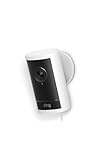
Ring Stick Up Cam Pro
Battery/Plug-in, 1080p, Radar 3D Motion
Ring's advantage has never been image quality; it is that everything works, immediately, and keeps working. The Stick Up Cam Pro adds a genuinely novel capability on top of that: radar-based motion detection that measures how far away something is rather than inferring movement from pixel changes. In practice that means you can set a detection zone that ends at your property line and it will actually respect it, ignoring the pavement traffic that produces most false alerts on conventional cameras. Bird's Eye View builds on the same radar data to plot the path a person took across your property, overlaid on a site map. As evidence, that is more useful than it first sounds — it distinguishes somebody walking past from somebody circling a house. The unit itself is flexible: indoor or outdoor, battery or plug-in, so a single model can cover every position in a typical installation, and setup is the fastest of any system here. The ecosystem argument is real too, with doorbells, alarms, and professional monitoring under one app. The cost is structural. Without a Ring Home subscription you get live view and notifications and no saved video, which for most buyers makes the subscription mandatory rather than optional. There is no local storage option at all, and at 1080p the resolution is behind the field.
Pros
- Radar-based 3D Motion Detection is the most precise motion zoning available — it measures distance, not just pixels
- Bird's Eye View shows the path an intruder took across your property, which is genuinely useful evidence
- Works indoors, outdoors, battery or plug-in from the same unit, so one model covers every position
- The largest ecosystem in home security, integrating with doorbells, alarms and professional monitoring
- Setup is the easiest here — most people are running in under ten minutes
Cons
- Almost every useful feature, including any saved video, requires a Ring Home subscription
- 1080p resolution and cloud-only storage, with no local recording option
The Bottom Line
The easiest system to live with and the best motion accuracy, provided you accept a permanent subscription as part of the price.

Wyze Cam v4
Plug-in, 2K, microSD Local Recording
There is a strong case for covering more of your house with inexpensive cameras rather than covering one corner beautifully, and the Wyze Cam v4 is the best expression of that argument. It delivers 2K resolution with colour night vision at a price where competitors are still shipping 1080p, and it will record continuously to a microSD card without a subscription — a combination that simply does not exist elsewhere at this price. Image quality is good enough for the job most cameras actually do: identifying who came to the door, confirming a delivery, checking on a pet or a contractor. At normal doorway distances faces are identifiable, and the colour night mode is usable rather than a marketing checkbox. Setup takes minutes and the app is straightforward enough that everyone in a household can use it. Two things to weigh. It is plug-in only, so every camera needs an outlet, and outdoor use means a weatherproof power arrangement that adds cost and complexity. And Wyze has had publicised security incidents, including an event where some users briefly saw thumbnails from other users' cameras. The company responded and changed its practices, but the history is relevant if these cameras are going anywhere private. For garages, porches, driveways and living areas, the value is difficult to argue with.
Pros
- 2K resolution and colour night vision at a price where most cameras are still 1080p
- Continuous recording to a microSD card with no subscription — genuinely unusual at any price
- Good enough image quality to identify faces at normal doorway distances
- Simple app and painless setup, with reliable notifications
- Cheap enough to cover a whole house for the price of one premium camera
Cons
- Plug-in only, so every position needs an outlet and outdoor placement needs weatherproof power
- Company has had security incidents in the past, and build quality is what you would expect at the price
The Bottom Line
Remarkable value for indoor coverage and covered porches. Not the camera to stake a perimeter on, but hard to argue with per dollar.
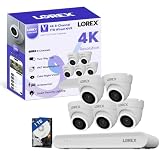
Lorex 4K PoE NVR System
Wired PoE, 4K, 2TB NVR, 8 Channel
Every battery camera in this comparison records events. A wired PoE system records everything, continuously, which is a fundamentally different proposition when you need to know what happened at a time nothing triggered a sensor. The Lorex 4K system writes 24/7 footage from eight cameras to an on-site NVR with a 2TB drive, and it keeps doing so whether or not your internet is up — a meaningful distinction, since cutting a household's broadband is not a difficult act. Power over Ethernet means a single cable carries both data and power to each camera, so there are no batteries to charge, no Wi-Fi congestion to manage, and no seasonal drop in performance when a solar panel spends three weeks under cloud. The cameras are properly weather-rated fixed hardware rather than consumer devices with a rubber flap over the port, and the 4K resolution gives you the pixel density to actually read a plate at driveway distance. Cost of ownership is where it wins outright: there is no subscription for any function, so over ten years the saving against a cloud system with four cameras runs into thousands. What it asks in return is installation. Running Ethernet to each position is genuine work — a weekend in an accessible house, an electrician's invoice in a finished one — and the NVR is a box that needs a home and, eventually, a replacement hard drive.
Pros
- Continuous 24/7 4K recording to an on-site NVR — not event clips, everything, all the time
- Power over Ethernet means one cable per camera and no batteries or Wi-Fi reliability concerns
- Nothing depends on the internet; the system keeps recording through an outage
- No subscription for any function, ever, which over a decade is a very large saving
- Cameras are properly weather-rated hardware built for permanent installation
Cons
- Installation means running Ethernet to every camera position, which is real work or a real invoice
- The NVR is a visible box that needs a home, and hard drives eventually fail and need replacing
The Bottom Line
The serious option. Continuous 4K recording, no subscriptions, no internet dependency — if you are willing to run cable.
4. Planning Coverage That Actually Works
Most home camera installations are decided by where it was easy to mount something, which is why so much footage shows the top of a head from twelve feet up. Coverage planning takes twenty minutes and improves results more than any hardware upgrade.
| Position | Priority | Mounting Height |
|---|---|---|
| Front door / porch | First — most deliveries and most visitors | 7-8 ft, angled at face height |
| Driveway | Second — vehicles and approach path | 8-10 ft, 4K for plates |
| Back or side door | Third — the least overlooked entry | 7-8 ft, spotlight useful |
| Main interior room | Fourth — catches anyone who got in | Corner, above eye line |
Mount at seven to eight feet rather than as high as the ladder reaches. Higher looks tidier and gives you the crown of a head; seven feet gives you a face. Angle so the subject walks toward the lens rather than across it, and keep any spotlight or porch light out of the camera's own frame, because a bright source in shot makes everything else silhouette.
5. The Specs That Decide Useful Footage
Resolution against distance. 1080p identifies a face at a doorway. 2K identifies a face across a porch. 4K is what you need to read a licence plate at the end of a driveway. Decide what you need to recognise and how far away it will be, and buy resolution accordingly rather than by default.
Colour night vision. Infrared tells you somebody was there; colour tells you what they were wearing, which is the difference between a clip that helps and one that does not. Colour night modes need either a spotlight or a very sensitive sensor, and the quality varies enormously between models.
Detection type. Pixel-change motion detection produces alerts for shadows, rain, headlights, and cats. On-device person, vehicle and package detection cuts that to a fraction. Radar-based zoning, as on the Ring Pro, goes further by measuring actual distance so a zone can stop at your property line.
Where the processing happens. On-device or on-hub detection produces faster alerts and keeps working when the internet is down. Cloud detection introduces a delay and a dependency, and means video leaves your home to be analysed.
Retention. A camera is worthless for anything you discover late if it only keeps three days. Check how long footage is kept on the plan you will actually pay for, and whether local storage is available as a backstop.
6. Subscriptions and the Real Ten-Year Cost
Hardware prices in this category are deliberately low because the business model is recurring revenue. Comparing cameras on purchase price alone is how people end up paying several times over.
| Approach | Monthly | Ten-Year Total |
|---|---|---|
| Cloud plan, 4 cameras | $10-$20 | $1,200-$2,400 |
| Local storage system | $0 | $0 plus a drive or card |
| Professional monitoring | $20-$60 | $2,400-$7,200 |
Professional monitoring is a different product and can be worth it — a service that calls the police when an alarm triggers is not something a camera provides. But be clear about which you are buying. Paying a monitoring-level fee for cloud video storage alone is the most common way households overspend in this category.
7. Privacy, Neighbours, and Audio
Recording video of your own property, including areas visible from it, is generally lawful across the United States. The three places people get into difficulty are audio, expectation of privacy, and aim.
Audio is governed by wiretapping and eavesdropping law rather than video law, and several states require all parties to a conversation to consent to its recording. A camera that records a conversation on a shared path or in a back garden can raise issues that the same camera recording silent video would not. Many systems let you disable audio recording per camera, and where you are unsure, that is the conservative setting.
Expectation of privacy is the second line. Cameras inside a home are your business, with the clear exception of bathrooms and bedrooms occupied by guests, lodgers, or anyone else who reasonably expects privacy there. If you rent out a room or use a short-term letting platform, disclosed exterior cameras are normal and undisclosed interior ones are not.
Aim is the practical one. A camera pointed into a neighbour's garden or through their windows creates a dispute you do not want and, in some jurisdictions, a legal problem. Use privacy zones — most systems support masking part of the frame — to black out what is not yours, and talk to neighbours before mounting something that overlooks their property. Rules vary by state and locality, so check your own if a camera will see beyond your boundary.
8. Wi-Fi, Installation and Keeping It Working
The most common cause of a camera system that disappoints is not the camera; it is Wi-Fi. Cameras sit at the edge of the house, often behind a wall of brick or foil-backed insulation, and stream continuously. Check signal strength at the mounting position before you drill, and be prepared to add an access point or mesh node — that is a cheaper fix than replacing cameras.
Most consumer cameras use the 2.4 GHz band because it travels further, which also means they compete with every other device in the neighbourhood. If several cameras drop out at the same times each day, channel congestion is the likely cause rather than the hardware. A dedicated network or a wired PoE system removes the problem entirely.
Maintenance is light but not zero. Clean the lens covers a couple of times a year, because spider webs and dust across the lens cause endless false alerts at night when the infrared illuminates them. Check battery levels seasonally on solar cameras, since three weeks of winter cloud can outpace charging. And update firmware — security cameras are internet-connected devices that have historically been a target, and outdated firmware is the most common vulnerability.
Finally, protect the account. Use a unique password and enable two-factor authentication on any camera account, especially one with interior cameras. The incidents that make headlines are almost always credential reuse rather than a breach of the manufacturer, and that is entirely within your control.
9. Frequently Asked Questions
What is the best home security camera in 2026?
The Reolink Argus 4 Pro is our overall pick — 4K, a 180-degree view, on-device detection, and local recording with no subscription. For local AI and the best night colour, the eufyCam S3 Pro is excellent. If you want the most accurate alerts and Google Home integration, choose the Nest Cam; if you want continuous 24/7 recording, a wired PoE system like the Lorex is the only real answer.
Do I need a subscription for security cameras?
Not if you choose a system with local storage. Reolink, eufy, Wyze and wired NVR systems record to a card, hub or drive with no monthly fee. Ring requires a subscription to save any video at all, and Nest gives three hours of free event history before asking for one. Over ten years with four cameras, a cloud plan costs $1,200 to $2,400 — often more than the hardware.
Are wired or wireless security cameras better?
Wired PoE systems are better for reliability and evidence: continuous 24/7 recording, no batteries, no Wi-Fi dependency, and nothing stops working during an internet outage. Battery and solar cameras are better for flexibility and ease — you can mount one anywhere in fifteen minutes. Most households end up with battery cameras because the installation cost of wiring is the real barrier.
What resolution do I need for a security camera?
Match resolution to distance. 1080p identifies a face at a doorway, 2K across a porch, and 4K is what you need to read a licence plate at the end of a driveway. Higher resolution also costs more storage and bandwidth, so there is no benefit in buying 4K for an indoor camera watching a hallway ten feet away.
Can I record audio on my security cameras?
Video of your own property is generally lawful, but audio is governed by separate wiretapping and eavesdropping laws, and several states require every party to a conversation to consent. Because a camera can pick up conversations on shared paths, many people disable audio on exterior cameras. Check your state's rules, and use the per-camera audio setting most systems provide.
Where should I put security cameras?
Front door first, driveway second, back or side door third, then one interior room. Mount at seven to eight feet rather than as high as possible — higher gives you the top of a head, seven feet gives you a face — and angle so people approach the lens rather than crossing it. Keep bright lights out of the frame, or everything in front of them becomes a silhouette.
Do security cameras actually deter burglars?
Visible cameras deter opportunistic crime, which is the majority of residential burglary, and surveys of offenders consistently list cameras and good lighting among the factors that make them choose a different house. They do not deter a determined intruder, and a camera by itself summons nobody. Treat cameras as deterrence, awareness and evidence — an alarm and good locks do a different job.
10. Common Security Camera Mistakes
Almost every disappointing camera installation fails for one of these five reasons, and all five are decided before anything is mounted.
Comparing Hardware Prices and Ignoring Subscriptions
Cameras are sold cheaply because the money is in the monthly fee. A four-camera cloud plan runs $1,200 to $2,400 over ten years, so a more expensive camera with local storage is frequently the cheaper system. Work out the ten-year total before choosing a brand.
Mounting Cameras Too High
Twelve feet up looks tidy and produces footage of the top of a head. Seven to eight feet, angled so people walk toward the lens, produces footage of a face — which is the entire point. Resist the urge to mount at the height the ladder happens to reach.
Buying 1080p for Long Distances
A 1080p camera watching a driveway gives you a person-shaped blur and an unreadable plate. Decide what you need to recognise and how far away it is before choosing resolution — and do not pay for 4K on an indoor camera watching a hallway.
Pointing a Camera at a Neighbour's Property
It creates a dispute you do not want and, depending on where you live, a legal problem. Use the privacy masking most systems offer to black out anything beyond your boundary, and speak to neighbours before mounting a camera that overlooks their garden or windows.
Reusing a Password on the Camera Account
Nearly every publicised incident of strangers viewing home cameras traces to credential reuse rather than a breach of the manufacturer. A unique password and two-factor authentication removes that risk almost entirely, and it costs nothing.
Related Home Systems Guides
The Bottom Line
The best home security camera for most households is the Reolink Argus 4 Pro: 4K, a 180-degree view that covers a whole driveway from one point, on-device detection, and local recording with no monthly fee. For local AI processing and the best night colour, the eufyCam S3 Pro is excellent. If alert accuracy matters more than resolution, the Nest Cam is unbeaten, and if you want continuous 24/7 footage the wired Lorex PoE system is the only real answer here.
Before you buy, do the arithmetic that the packaging avoids: add up ten years of subscription for the number of cameras you plan to own, and mount at seven to eight feet rather than as high as the ladder reaches. The first decides what the system costs; the second decides whether the footage shows a face.
More in Home Improvement
Guides in this category that pair with what you just read.
About the Author
Alex Rivers, Home Improvement Editor
Alex has spent over a decade working on residential and light commercial property maintenance, and now tests every tool, coating and machine that appears in these guides personally.